Appearance
HTML / CSS / JS 笔记
HTML 基础标签
html
<!--单标签(空标记)-->
<img/>
<br/>
<!-- 双标签(常规标记) -->
<div></div>
<!-- 特殊符号 -->
<
>
©
<!-- 列表 -->
<ul >
<li></li>
</ul>
<ol type="a" start="3">
<li></li>
</ol>
<dl>
<dt></dt>
<dd></dd>
</dl>表格
html
<!-- table属性: -->
<table border="" cellspacing="" cellpadding="" bordercolor="" align="center">
<tr valign="middle">
    <td colspan="2"></td> <!-- 合并列 -->
    <td rowspan="2"></td> <!-- 合并行 -->
</tr>
</table>
<style>
{empty-cells:hide;}/*隐藏空单元*/
{border-collapse: collapse;}  /*单线*/
{border-top: 50px solid red;
border-left:150px solid blue;} /*斜线*/
</style>
<corgroup><col span="2" style=""></corgroup> <!-- 列样式 -->
表单
html
<!-- 表单:  -->
<form action="https://www.baidu.com/" method="GET" enctype="">
 <input type="text" name="wd" value="用户" placeholder="请输入关键字" >
 <!-- autocomplete="off" 不自动储存历史记录   -->
 <style>
    input{outline:none;} /*取消表单文本框选择时的蓝框*/
 </style>
 <!-- 文本不可选取: -->
 <div onselectstart="return false;" style="cursor: default;"></div>
 <input type="password" >
 <input type="button" value="按钮">
 <input type="submit">
 <input type="reset">
 <input type="radio" checked=true> <!-- 单选框 --> <!-- 单选框选中 -->
 <input type="checkbox"> <!-- 复选框 -->
<select>
  <option disabled value="">请选择</option>
  <option value="volvo">Volvo</option>
  <option value="saab">Saab</option>
  <option value="opel">Opel</option>
  <option value="audi">Audi</option>
</select>
 <textarea cols="" rows="" style="resize: none"></textarea> <!-- 文本输入域 -->
 <button>按钮</button>
</form>
<button>注册</button>
<label for="id名">文字</label>
<div  contenteditable="true"> <!-- 可编辑DIV -->
CSS 选择器与优先级
css
/*CSS选择器*/
/*元素选择器*/
div{}
/*id选择器*/
#box{}
/*class选择器*/
.box{}
/*群组选择器:*/
.box,.box2,.box3{}
/*后代选择器:*/
.box li{}
/*子元素选择器:*/
.box>li{}
/*伪类选择器:*/
a:link{}
a:visted{}
a:hover{}
a:active{}/*激活状态*/

/* 权重:同级:从上往下(后面覆盖前面的属性)*/
/* 外部样式 */
<link rel="stylesheet" type="text/css" href="XX.css">
@import url("css.css");

/* 内部样式 */
<style type="text/css"></style>
/* 内联样式 */

<div style="width:100px;">

/* 样式权重:内联样式(1000)>内部样式=外部样式
 选择器权重:id(100)>class(10)>元素(1)*/
<style>
 :box{color:red !important;}/*!important可以提升优先级,不能对继承的属性使用*/
</style>
rel
stylesheet(加载CSS):浏览器必须解析 CSS 才开始渲染页面
preload(预加载)- 优先级最高:这个资源马上就会用到,请提前下载,as 属性必须写。
prefetch(预获取):当前页面不用,但下一个页面可能会用,浏览器空闲时下载
preconnect(提前建立连接):提前完成DNS TCP TLS
dns-prefetch(DNS预解析):只做DNS
icon(网站图标)
apple-touch-icon(苹果设备桌面图标)
canonical(SEO)告诉搜索引擎: 真正的网址是哪一个。
alternate:RSS
| preload | prefetch |
|---|---|
| 当前页面马上使用 | 下一页面可能使用 |
| 高优先级 | 低优先级 |
| 页面加载阶段下载 | 浏览器空闲下载 |
| 首屏优化 | 路由切换优化 |
字体与文本
css
*{
color;
font-size:;/*(px,pt,em)*/
/*字体大小默认16px
12pt=16px
1em=16px
(em:父标签的字体大小决定子标签的字体大小)*/
font-weight:/*(normal,bold,bolder,lighter,100-900);*/
font-style:italic/oblique;
font-family:;
font-decoration:line-through;
font-decoration:underline;
font-decoration:overline;
font-decoration:none;
text-align:left,right,center,justify(两端对齐)
/*垂直居中:*/
vertical-align:middle /*适用于行内块元素:img,input*/
/*baseline对齐比bottom高一些*/
/*baseline为默认对齐方式,会留空白间隙*/
首行缩进:text-indent:2em
}
user-select: none;文字不被选中
css
*{
/*设置间距:*/  letter-spacing:;
/*设置单词之间的间距:*/word-spacing:;
/*首字母大写:*/text-transform: capitalize;
/*到大写:*/text-transform: uppercase;
/*到小写:*/text-transform: lowercase;
/*无转换:*/text-transform: none;
/*自上而下显示:*/layout-flow:vertical-ideographic;
/*font符合属性 (font-weight,font-style,font-size(必要)/line-height,font-family(必要))*/
font:bold italic 100px/100px "微软雅黑";
}
边框、背景与列表
css
/*border复合属性(大小 颜色 样式)(不分次序)*/
border:1px solid red;
border-width:20px 10px;/*上下,左右*/
border-width:20px 10px 30px;/*上,左右,下*/
border-width:20px 10px 30px 5px; /*上,右,下,左*/
border-style: solid;/*solid-实线 dashed-虚线 dotted-点状线 double-双线*/
border-color:blue;
border-collapse: collapse;/*边框合并*/
border-collapse: separate;/*边框合离*/

/*background复合属性 (background-color background-image background-repeat background-position*/)
background:yellow url(a.jpg) no-repeat 10px 10px;
background-repeat:no-repeat;
background-repeat:repeat-x;
background-repeat:repeat-y;
background-position:left/center/right   top/center/bottom;/*取一个值的时候另一个值居中*/
background-attachment: fixed; /*背景图固定*/
background-attachment: scroll;/*默认值:背景图滚动*/
background-size:[width],[height];/*背景图像大小,单位px或者%,一个值时,另一个值自动*/
background-size:cover;/*完全覆盖背景区域*/
background-size:contain;/*根据内容大小适应并平铺*/
background-origin: border-box||padding-box||content-box;
background-clip:  border-box||padding-box||content-box;/*图片以外的平铺内容会被裁掉*/
/*列表样式:*/
list-style-type:square;
list-style-type:disc;
list-style-type:none;
list-style-type:circle;
list-style-image:url(a.jpg);
list-style-position:outside;
list-style-position:inside;
/*inside  列表项目标记放置在文本以内,且环绕文本根据标记对齐。
outside 默认值。保持标记位于文本的左侧。列表项目标记放置在文本以外,且环绕文本不根据标记对齐。*/
/*list-style复合属性*/
list-style:/*[ list-style-type ] || [ list-style-position ] || [ list-style-image ]*/
形状与常用技巧
css
/* a标签填满整个区域 */
.more a{
    display: block;
    width:100%;
    height: 100%;
}
/*倒三角形*/
.detla{
    width:0px;
    height:0px;
    border-top:20px solid red;
    border-left:20px solid transparent;
    border-right:20px solid transparent;   /*transparent为透明色*/
}
/*半圆*/
{width:300px;height:150px;border-radius: 150px 150px 0 0;}

/*四角边框CSS*/
.box-border{
    position: relative;
    background: transparent;
    //border:2px rgb(40, 70, 116) solid;
    box-shadow:rgb(40 70 116 / 50%) 0px 0px 40px inset;
    margin: 0 0 15px;
    border: 2px solid rgb(124, 231, 253);
    border-radius: 8px;
    z-index: 0;
    &:before {
      position: absolute;
      top: -2px;
      bottom: -2px;
      left: 30px;
      width: calc(100% - 60px);
      content: "";
      border-top: 2px solid $corner;
      border-bottom: 2px solid $corner;
      z-index: -1;
    }
    &:after {
      position: absolute;
      top: 30px;
      right: -2px;
      left: -2px;
      height: calc(100% - 60px);
      content: "";
      border-right: 2px solid $corner;
      border-left: 2px solid $corner;
      z-index: -1;
    }
过渡、变形与动画
css
/* CSS3动画*/
/*1.过渡*/
/* transition不要加到hover里*/
transition-property: width; transition-property: all;/*默认*//*CSS属性名称*/
transition-duration: 1s;/*过渡时间*/
transition-delay: 1s; /*延迟*/
transition-timing-function: linear(匀速)|ease(默认)|ease-out(加速)|ease-in-out(减速) /*速度效果曲线*/
transition:1s 2s ease;/*复合写法*/

/*2.变形*//*只能用于块元素*/
transform: translate(translateX,translateY)|scale(scaleX,scaleY)|rotate|skew(skewX,skewY);
/*2.1位移*/
transform: translate(100px,0);
/*2.2缩放*/
transform: scale(2,2); transform: scale(2);
/*2.3旋转*/
transform: rotate(45deg);/* 正值顺时针 复制逆时针*/
 /*2.4斜切*/
transform: skew(45deg,45deg); transform: skew(45deg);正值向左,负值向右
transform-origin: top right;/*设定基点,与transition写一起*/
/* 优惠券锯齿: */
 .coupon {
   ...
   background-image:
     radial-gradient( /* 左边波浪 */
       circle at 1px 8px,
       transparent 6px,
       #ff9e6d 6px,
       #ff9e6d 0px),
     radial-gradient( /* 右边波浪 */
       circle at 199px 8px,
       transparent 6px,
       #ff9e6d 6px,
       #ff9e6d 0px);
   background-size: 200px 18px;
   background-position: 0 0, 200px 0;
   background-repeat-x: no-repeat;
 }
 /*animation*/
animation-name: ; /*动画名字*/
animation-duration: ;/*持续时间*/
animation-delay: ;/*延迟时间*/
animation-iteration-count:;/*重复次数,infinite无限*/
anmiation-timing-function:;/*运动曲线*/
 animation:xxx 1s infinte linear;

    animation-fill-mode :规定动画播放之前或之后,其动画效果是否可见。
    none (默认值) :在运动结束之后回到初始位置,在延迟的情况下,让0%在延迟后生效
    backwards : 在延迟的情况下,让0%在延迟前生效
    forwards : 在运动结束的之后,停到结束位置
    both : backwards和forwards同时生效
    animation-direction : 属性定义是否应该轮流反向播放动画,
    alternate : 一次正向(0%~100%),一次反向(100%~0%)
    reverse :永远都是反向,从100%~0%
    normal (默认值) :永远都是正向,从0%~100%
    /*animate第三方库*/
    class="animated bounceIn"
css
@keyframes xxx{}
    0%{
        transform: rotate(0deg);
}
    100%{
        transform: rotate(180deg);
        }
@keyframes xxx{}
    from{
        transform: rotate(0deg);
}
    to{
        transform: rotate(180deg);
        }
盒模型、溢出与省略号
css
*{
    box-sizing: content-box; /*content: */
    box-sizing: border-box; /*content:,padding,border,可以省去padding的计算(重点)*/
    margin: 叠加问题:值越大优先
    overflow:hidden;
    overflow:visible;/*默认*/
    overflow:scroll;/*滚动,强制出现滚动条*/
    overflow:auto;/*滚动条自动*/
    overflow-x:hidden;/*横向溢出隐藏,可取消横向滚动条*/
    /*省略号的加法*/
    overflow:hidden;
    white-space:nowrap;/*不换行*/
    text-overflow: ellipsis;/*超出部分省略号*/
}
滚动、多媒体与代码展示
html
<!-- 滚动标签 -->
<marquee class="list2" direction="up" width="220" height="20" scrollamount="2">
<!-- 鼠标移入是显示提示: -->
<title="提示">
<pre><code>代码(需转义)</code></pre> <!-- 针对网页中的程序代码的显示效果 -->
<audio src="" controls loop autoplay></audio> <!-- 音频 -->
<video src="" controls></video> <!-- 视频 -->
Display 与居中
css
*{
   /* 共18个属性*/
display:block;/*独占一行,支持宽高*/
display:inline; /*挨在一起,不可设置大小*/ /*font-size: :0;可以取消之间的间距*/
display:inline-block;/*挨在一起,支持宽高*/
display:table-cell;
display: none;/*(不占空间)*/
visibility:hidden;/*占空间
}*/
/*中心居中:*/
/*方法一 单元格法*/
      /* img居中*/
        .box1{ /*不能有浮动*/
            background-color: yellow;
            width:500px;
            height:500px; /*必须给高度,必须给高度,必须给高度*/
            display: table-cell;
            text-align: center;
            vertical-align: middle;
        }
        .box1 img{
            vertical-align: middle;
        }
       /* div居中*/
        .box1{
            background-color: yellow;
            width:500px;
            height:500px;
            display: table-cell;
            vertical-align: middle;
        }
        .box2{
            margin: 0px auto;/*(图片等块元素居中通用)*/
            width:200px;
            height:200px;
            background: red;
        }
/*方法二:flex*/
            display: flex;
            flex-direction: row;
            justify-content:center;
            align-items: center;
/*li中的图居中:(有行高的情况下使用)*/
.headli li img{
    vertical-align: middle;
    }
清除浮动的方法
1.父元素设置属性overflow: hidden
2.增加额外标签,然后添加属性clear: both
3.伪类after伪类清除
HTML5 语义化标签
html
<meta name="description" content="">
<meta name="keywords" content="">
<link rel="icon" type="/image/x-icon" href=""><!-- 添加网址图标 -->
<!-- h5新标签 -->
<header>
    <hgroup></hgroup>
    <nav></nav>
</header>
<main>
    <article>
        <section>
         <datalist id=""><!-- 选项列表 -->
             <option></option>
         </datalist>
         <details open> <!-- 文档细节 -->
             <summary>html</summary>
             <p>111</p>
         </details>
         <progress min="0" value="8" max="10"></progress> <!-- 进度 -->
         <meter min="0" value="8" max="10" low="2" high="5"></meter>
         <time title="2-14">情人节</time>
         <mark>情人节</mark>
        </section>
        <section>
            <ul>
                <li>
                    <figure>
                        <img src="">
                        <figcaption></figcaption>
                    </figure>
                </li>
            </ul>
        </section> <!-- 区域 -->
    </article> <!-- 独立部分 -->
    <aside></aside><!-- 辅助信息 -->
</main>
<footer></footer>
<!-- 其中header,main,footer只能出现一次 -->

<!-- block(可以设置大小):body,p,h1,div,ul,li,ol,dl,dt,dd,form,hr,input,table,tr,td,tbody,th
    *inline(不可设置大小):独占一行,可以设置大小,块元素可以包含任何标签
:a,span,b,strong,i,em,u,s,del,sub,sup
     *一行显示多个,不能直接设置大小,行内元素一般包含行内元素,不推荐使用margin-top/bottom,padding-top/bottom
     *inlne-block:img,input,select 可以设置大小-->
伪类、定位与其他属性
css
*{
 .box1:after{content:"xxf";}
 .box1:before{content:"xxf";}
 :checked /*表单选中时*/
 :disabled/*表单未选中时*/
 :focus /*表单文本框用*/
 结构性伪类选择器
 li:nth-of-type(2) ;/*索引从1开始,n表示[0,+∞),2n(偶数),2n+1(奇数)(用于li)*/
 /*作用于同一类型*/
 li:nth-child; /*无视类型*/
 li:first-of-type ;/*第一个*/
 li:last-of-type ;/*最后一个*/
 li:only-of-type ;/*只能是一个时生效*/


 white-space:pre;/*(处理留白,识别空格和换行)*/
 white-space:pre-line;/*(识别换行)*/
 white-space:pre-wrap;/*(识别空格和换行,自动换行)*/
 /*定位*/
 left:;
 right:;
 top:;
 bottom;
 position:relative;/*相对自己定位,遵循正常文档流,占空间*/
 position:absolute;
 /*相对于父标签定位,若子父都有定位(除了static),相对父标签定位,否则相对于浏览器定位,不占空间,脱离文档流*/
 position:fixed;/*相对于浏览器定位,脱离文档流*/
 position:sticky;页面滚动到一定位置,实现的固定定位,介于相对和固定之间的定位

 border-radius:左上角 右下角,右上角左下角(两个值)
  border-radius:左上,右上,左下,右下(四个值)

 inherit/*强制继承*/
 intial /*最初*/
 unset/*继承可以继承的*/
 opacity:0-1
 rgba();
 cursor:pointer|move|url(.ico),auto;
 透明度兼容性写法:filter(opacity:0-100)
 max-height,min-height,max-width,min-width
 box-shadow: 0 0 5px #888;/*盒子阴影*/
}
BFC 与特殊样式
css
<!-- 南京大屠杀专用style: -->
<style>
*{filter: grayscale(100%);
}
触发BFC:float:none以外的值
position:absolute,fixed
display:inline-block,table-cells,flex
overflow除visible以外的值
Flex 布局
css
/*FLEX弹性布局*/
*{
              display: flex;
              flex-direction: row(默认值) | row-reverse | column | column-reverse;
/*            row(默认值):主轴横向,方向为从左指向右。项目沿主轴排列,从左到右排列。
              row-reverse:row的反方向。主轴横向,方向为从右指向左。项目沿主轴排列,从右到左排列。

              column:主轴纵向,方向从上指向下。项目沿主轴排列,从上到下排列。

              column-reverse:column的反方向。主轴纵向,方向从下指向上。项目沿主轴排列,从下到上排列。*/
              flex-wrap: nowrap(默认值) | wrap | wrap-reverse;
              /*nowrap(默认值):不换行。如果单行内容过多,则溢出容器。
              wrap:容器单行容不下所有项目时,换行排列。
              wrap-reverse:容器单行容不下所有项目时,换行排列。换行方向为wrap时的反方向。*/
              flex-flow:row nowrap; /*复合写法*/
              /*主轴方向*/
              justify-content: flex-start(默认值) | flex-end | center | space-between | space-around| space-evenly;
/*
            flex-start(默认值):项目对齐主轴起点,项目间不留空隙。

            center:项目在主轴上居中排列,项目间不留空隙。主轴上第一个项目离主轴起点距离等于最后一个项目离主轴终点距离。

            flex-end:项目对齐主轴终点,项目间不留空隙。

            space-between:项目间间距相等,第一个项目离主轴起点和最后一个项目离主轴终点距离为“0”(0)

            space-around:与space-between相似。不同点为,两端间隔为中间的一半(一半)

            space-evenly:项目间间距、第一个项目离主轴起点和最后一个项目离主轴终点距离“等于”项目间间距。(相等)*/
            /*交叉轴*/
            align-items:stretch(默认值) | flex-start | center | flex-end | baseline;
/*          stretch(默认值):项目拉伸至填满行高。
            flex-start:项目顶部与行起点对齐。
            center:项目在行中居中对齐。(垂直方向居中)
            flex-end:项目底部与行终点对齐。
            baseline:项目的第一行文字的基线对齐。*/
            align-content: stretch(默认值) | flex-start | center | flex-end | space-between |space-around | space-evenly    /*多行用*/

            order: 0
            flex-grow: 1;/*扩张因子,值越大,扩张越大*/ 默认值0
            /*当项目在主轴方向上还有剩余空间时,通过设置项目扩张因子进行剩余空间的分配。属性值为项目的扩张因子*/
            flex-shrink:0.2;/*收缩因子,值越大,收缩越紧*/ 默认值1  0时不收缩
           /* 当项目在主轴方向上溢出时,通过设置项目收缩因子来压缩项目适应容器。属性值为项目的收缩因子*/
            flex-basis: auto(默认值) | <number>px;/*(优先于width或者height)*/
            flex: flex-grow|flex-shrink|flex-basis;
            flex:0 1 auto;表示项目不放大、按比例缩小且初始大小为内容大小
			flex: auto 等价于 flex: 1 1 auto
			flex: 1:等同于 flex: 1 1 0%表示项目放大、缩小且初始大小为内容大小
            align-self: center;/*单个对齐方式*/
              }
Grid 布局
css
/*grid网格布局*/
{
	display: grid;
	grid-template-columns: 100px 100px 100px;列宽(单位px,fr)
	grid-template-rows: 100px 100px 100px;行高

	1.repeat()函数,简化重复的值,接受两个参数,第一个参数是重复的次数,第二个参数是所要重复的值,也可以重复某个模式
    grid-template-columns:1fr 1fr 1fr 1fr; 等价于grid-template-columns:repeat(4,1fr);
    auto-fill/auto-fit(这两个关键字都用于 repeat() 函数中第一个参数,
	auto-fill会用空格子填满剩余宽度,auto-fit则会尽量扩大单元格的宽度,单元格宽度不固定的时候,才会有行为差异)

	2.minmax()函数,产生一个长度范围,表示长度就在这个范围之中。它接受两个参数,分别为最小值和最大值

	3.自定义网格线名称,每个网格线可以指定多个名字,指定网格布局为3*3,因此有4根垂直网格线和4根水平网格线
	grid-template-columns: [c1] 100px [c2] 100px [c3] auto [c4];
	grid-template-rows: [r1] 100px [r2] 100px [r3] auto [r4 xipiker666];

	4.grid-columns-gap(columns-gap列间距)与grid-rows-gap(rows-gap行间距)与grid-gap(gap间距)
	grid-gap: <行间距> <列间距>;
	grid-template-areas作用:网格布局允许指定"区域"(area),一个区域由单个或多个单元格组成;
	grid-area:a;
	/*i.grid-area属性指定项目放在哪一个区域,配合grid-template-areas使用;
	ii.grid-area属性还可用作grid-row-start、grid-column-start、grid-row-end、grid-column-end的合并简写形式 */
	grid-template-areas:
    "a b c"
    "d e f"
    "h i g";
	有些区域不需要利用,则使用.表示
	grid-template-areas:
	  'a . a'
	  'b . b'
	  'c . c';
    grid-template:/*复合写法*/
    "a b c" 1fr
    "d e f" 1fr
    "h i g" 1fr
    /1fr 1fr 1fr;
	5.设置单元格内容的水平位置
    justify-items:start|center|end;
    align-items:start|center|end;
    place-items:<align-items> <justify-items> ;/*复合写法,先纵后横*/
	6.设置内容区域在容器里面的水平位置
    justify-content:start|center|end|space-between |space-around | space-evenly;
    align-content:start|center|end|space-between |space-around | space-evenly;
    place-content:start end; /*复合写法,先纵后横*/
	7.grid-auto-flow:row | columns | row dense | columns dense;
	容器的子元素的排序方式,
	属性值row先行后列,
	属性值columns先列后行,
	下面2个属性会尽可能紧密填满,尽量不出现空格
	属性值row dense子项目指定位置后再"先行后列"排序,
	属性值columns dense子项目指定位置后再"先列后行"排序
    8.grid-auto-columns与grid-auto-rows
	用法:
	grid-template-columns: 100px 100px; /* 显式定义前两列 */
	grid-auto-columns: 50px; /* 为第3列及之后的隐式列设置默认宽度为50px */
	 9.其他属性
    {
     grid-column-start:2;左边框所在的垂直网格线
     grid-column-end:3;右边框所在的垂直网格线
     grid-column:<grid-column-start> / <grid-column-end>;/*复合写法*/
     grid-row:<grid-row-start> / <grid-row-end>;/*复合写法*/
     grid-area: <row-start> / <column-start> / <row-end> / <column-end>; /*复合写法*/
     grid-area:1/1/3/3;/*表示位置,分别为横1,纵1,横2,纵2*/
     justify-self:start | end | center | stretch;
     align-self: start | end | center | stretch;
     place-self:<align-self> <justify-self>; /*复合写法,先纵后横*/
    }
  }
Viewport 与单位
html
<!-- viewport -->
<meta name="viewport" content="width=device-width, initial-scale=1, minimum-scale=1, maximum-scale=1, user-scalable=no">
<!-- vw把屏幕分为了100份,屏幕宽等于100vw -->
txt
1、px
1)px就是pixel的缩写,意为像素。
2)px就是设备或者图片最小的一个点,比如常常听到的电脑像素是1024x768的,表示的是水平方向是1024个像素点,垂直方向是768个像素点。
3)px是我们网页设计常用的单位,也是基本单位。
4)通过px可以设置固定的布局或者元素大小。
5)缺点:没有弹性。

2、rpx
1)rpx 是微信小程序解决自适应屏幕尺寸的尺寸单位。
2)rpx(responsive pixel): 可以根据屏幕宽度进行自适应。
3)微信小程序规定屏幕的宽度为750rpx。
4)解释:例如宽度,相当于把屏幕宽度分为750份,1份就是1rpx。高度类似~

3、em
1)参考物是父元素的font-size,具有继承的特点。
2)如果自身定义了font-size按自身来计算(浏览器默认字体是16px),整个页面内1em不是一个固定的值。
3)特点是1. em的值并不是固定的; 2. em会继承父级元素的字体大小。
4)1em=1倍父元素font-size的值,2em=2倍父元素font-size的值,以此类推……

4、rem
1)rem是相对于根元素html,这样就意味着,我们只需要在根元素确定一个参考值,可以设计HTML为大小为10px,到时设置1.2rem就是12px.以此类推。
2)优点是,只需要设置根目录的大小就可以把整个页面的成比例的调好。

5、%
一般来说就是相对于父元素的:
1)对于普通定位元素就是我们理解的父元素
2)对于position: absolute;的元素是相对于已定位的父元素
3)对于position: fixed;的元素是相对于ViewPort(可视窗口),

6、vw
1)css3新单位,view width的简写,是指可视窗口的宽度。假如宽度是1200px的话。那100vw就是1200px,10vm就是120px,以此类推……
2)举个例子:浏览器宽度1200px, 1 vw = 1200px/100 = 12 px。

7、vh
和vw相似
1)css3新单位,view height的简写,是指可视窗口的高度。假如高度是1200px的话。那100vh就是1200px,10vh就是120px,以此类推……
2)举个例子:浏览器高度900px, 1 vh = 900px/100 = 9 px。
html
<!-- rem布局 -->
<style type="text/css">
  html{font-size:100px;}
  body{font-size:16px;}
</style>
媒体查询
html
<!-- media选项:and,not,min-width(>),max-width(<),oprientation:portrait、oprientation:landscape -->
<!-- 注意:一定要写空格  -->
<style>
/*四个档位:*/
@media (min-width: 576px) {
  .container {
    max-width: 540px;
  }
}

@media (min-width: 768px) {
  .container {
    max-width: 720px;
  }
  .mobile{
    display: none;
  }
}

@media (min-width: 992px) {
  .container {
    max-width: 960px;
  }
}

@media (min-width: 1200px) {
  .container {
    max-width: 1140px;
  }
}

/*特殊条件*/
@media all and (min-width:500px) and (max-width:700px){
  .box{
    background: blue;
  }
}
@media not all and (oprientation:landscape) {
  .box{
    background: blue;
  }
}
<link rel="stylesheet" href=".css" media="all and (oprientation:landscape)">
/*常见修改样式:display,float,width*/
</style>
Bootstrap 常用
html
<!--  bootstrap常用类 -->
<div class="container"></div><!-- 版心 -->
<div class="container-fluid"></div><!-- 通栏 -->
<!-- col分12格 -->
<div class="col-sm"></div>
<div class="col-md"></div>
<div class="col-lg"></div>
<div class="col-xl"></div>
<div class="col-auto"></div>
<div class="w-100"></div> <!-- 换行 -->
<div class="no-gutters"></div><!-- 取消margin,padding间距 -->
<div class="offset-3"></div><!-- 三个空col -->

<!-- 带响应按钮导航栏 -->
<nav class="navbar navbar-expand-lg navbar-light bg-light">
  <a class="navbar-brand" href="#">Navbar</a>
    <button class="navbar-toggler" type="button" data-toggle="collapse" data-target="#navbarNav" aria-controls="navbarNav" aria-expanded="false" aria-label="Toggle navigation">
      <span class="navbar-toggler-icon"></span>
    </button>
   <div class="collapse navbar-collapse" id="navbarNav">
  <ul class="navbar-nav">
      <li class="nav-item"><a class="nav-link" href="#">产品介绍</a></li>
      <li class="nav-item"><a class="nav-link" href="#">成功案例</a></li>
      <li class="nav-item"><a class="nav-link" href="#">关于我们</a></li>
      <li class="nav-item"><a class="nav-link" href="#">系列教程</a></li>
  </ul>
  </div>
</nav>
<script src="js/jquery-1.12.4.min.js" type="text/javascript" charset="utf-8"></script>
<script src="bootstrap-4.4.1-dist/js/bootstrap.js" type="text/javascript" charset="utf-8"></script>
<!-- 搜索框+按钮 -->
<form class="form-inline">
<input class="form-control mr-sm-2" type="search" placeholder="Search" aria-label="Search">
<button class="btn btn-outline-success my-2 my-sm-0" type="submit">Search</button>
</form>
<!-- 标准带间隔轮播图 -->
<div id="carouselExampleIndicators" class="carousel slide carousel-fade" data-ride="carousel"> <!-- 带淡入淡出效果:carousel-fade -->
<ol class="carousel-indicators">
  <li data-target="#carouselExampleIndicators" data-slide-to="0" class="active"></li>
  <li data-target="#carouselExampleIndicators" data-slide-to="1"></li>
  <li data-target="#carouselExampleIndicators" data-slide-to="2"></li>
</ol>
<div class="carousel-inner">
  <div class="carousel-item active" data-interval="2000"> <!-- 设置间隔 -->
    <img src="..." class="d-block w-100" alt="...">
   <!--  文字描述 -->
<!--       <div class="carousel-caption d-none d-md-block">
    <h5>First slide label</h5>
    <p>Nulla vitae elit libero, a pharetra augue mollis interdum.</p>
  </div> -->
  </div>
  <div class="carousel-item">
    <img src="..." class="d-block w-100" alt="...">
  </div>
  <div class="carousel-item">
    <img src="..." class="d-block w-100" alt="...">
  </div>
</div>
<a class="carousel-control-prev" href="#carouselExampleIndicators" role="button" data-slide="prev">
  <span class="carousel-control-prev-icon" aria-hidden="true"></span>
  <span class="sr-only">Previous</span>
</a>
<a class="carousel-control-next" href="#carouselExampleIndicators" role="button" data-slide="next">
  <span class="carousel-control-next-icon" aria-hidden="true"></span>
  <span class="sr-only">Next</span>
</a>
</div>
<!-- 弹性盒 -->
<div class="d-flex"></div>
<div class="flex-column"></div> <!-- 垂直排列 -->
<div class="flex-column flex-sm-row"></div> <!-- 达到sm条件时横向排列 -->
<div class="justify-content-center"></div>
<div class="justify-content-start"></div>
<div class="justify-content-end"></div>
<div class="align-items-center"></div>
<div class="align-items-start"></div>
<div class="align-items-end"></div>
<div class="align-self-center"></div>
<div class="align-self-start"></div>
<div class="align-self-end"></div>

<div class="text-center"></div><!-- 文字居中 -->
<div class="text-white"></div><!-- 白色字体 -->
<div class="font-weight-bold"></div><!-- 加粗 -->
<div class="text-decoration-none"></div><!-- 去下划线 -->
<div class="btn btn-primary"></div> <!-- 实心蓝色按钮 -->
<div class="btn btn-sm btn-outline-primary"></div> <!-- 空心按钮 -->
<div class="border rounded"></div> <!-- 圆角边框 -->
<div class="border-bottom"></div><!-- 水平线 -->
<div class="overflow-auto"></div><!-- 自适应滚动条 -->
<div class="d-none d-md-block"></div> <!-- 达到md条件时显示 -->
<div class="shadow-sm"></div><!-- 阴影 -->
<div class="list-unstyled"></div><!-- 列表去点 -->
<div class="clearfix"></div><!-- 清浮 -->
<div class="card-body form-inline"><!-- 行内表单 -->
    <input type="text" class="form-control" /> <!-- 文本框 -->
    <input type="text" class="form-control" />  <!-- 文本框 -->
</div>
<table class="table table-bordered table-hover table-striped"></table><!-- 建立表格 -->
Less 与 Sass
css
<!-- less和sass -->
<!-- 单行注释不会被编译出来,多行可以 -->
<style>
 /*less:*/
 @a=1;/*1.变量*/
 @{a}{} /*2.插值*/
 作用域:就近原则
 /*3.嵌套*/
        ul{
        list-style:none;
            li{
            float:left;
            div{margin:10px;}
            p{margin:20px;}
        }
        &:hover{color:red}
        }
/* 4.转义*/
{width:~"20px/1.5"}
/*5.运算:单位不同时,以第一个为准*/
{width:round(3.5px)}/*四舍五入*/
{width:percentage(0.2)}/*百分比*/
{width:sqrt(25)}/*开方*/
/*6.混入*/
.show(){}   /*不生成*/
.hide(@color){
    color:@color
 } /*传参数*/
.box{
    .show
    .hide(blue)
}
/*7.命名空间*/
#nm(){.show{}}
.box{#nm.show}
/*8.继承*/
&:extend(.line)
/*9.合并*/
{background+:url();/*逗号合并*/
transform+_:url();}/*空格合并*/
/*10.条件*/
.get(@cn) when(@cn>4){}
/*11.引入*/
@import '.less';

/*scss:*/
安装: npm install -D sass sass-loader
$a /*1.变量*/
#{$a}/*2.插值(特殊变量)*/
 作用域:按顺序
 /*3.属性嵌套*/
 font:{
         size:10px;
         weight:bold;
}
/*4,运算 */
/*单位不同时,报错,“/”默认为分割操作,强制计算:(20px/1.5)*/
{width:random()} /*随机数*/
/*自定义函数*/@function sum($n,$m){@return $n+$m;}
/*5.混入(类似于return函数)*/
@mixin声明函数,@include调用
@mixin textstyle($color:red)
{
	color:$color
}
.div{
    @include textstyle();使用混入
}
.div2{
    @include textstyle(blue);使用混入
}
/*6.继承*/
.div{
	width: 100px;
}
.div2{
	@extend .div
}
.div3{
	@extend .div3;/*继承*/
}
%div3{
	width: 100px;
}
.div4{
	@extend %div3; /*占位继承,line不生成*/
}

/*7.合并*/
$background:(a:url(),b:url());
box{background:map-values($background);/*逗号合并*/
background:zip(map-values($transform)...);/*空格合并*/
}
/*8.条件*/
.box{
@if(){}
@else{}
}
@for $i from 0 through 2{
    .box#{$i}{}
}
</style>
JavaScript 基础
js
typeof //类型
arguments//函数参数,需在函数体内使用
(-5)%3==-2
// 到布尔型
Boolean('')==false;
Boolean(0)==false;
Boolean(NaN)==false;
Boolean(undefined)==false;
Boolean(null)==false;
 //到整型
parseInt('123abc')==123;
parseInt('2',1)==NaN;
parseInt('14',2)==1;
//到文本
String(14)=='14';
var num=26;
num.toString()='26';
num.toString(2)='11010';
toString().padStart(2,'0') 补位方法
String.trim()//删收尾空
// 判断
if(){} else(){}
if(){} else if(){} else if(){}
switch(表达式){
 case 值1:代码段1;break;
 case 值2:代码段2;break;
 default:代码段;
}
//循环
while(){}
do{}while();
for(var i=0;i<5;++i){}// let是块级变量,仅大括号内生效
数组与字符串
js
// 创建数组
var arr=new Array(1,2,3);
var arr=[1,2,3];
//数组遍历,对象同理
for(var i in arr){
 console.log(arr[i]);
}
// 删除数组
delete arr[1];
// 数组方法
arr.push();// 末尾添加
arr.pop();// 末尾移出
arr.unshift();// 开头添加
arr.shift();// 开头移除
arr.isArray(arr); // 判断是否为数组
arr.includes(1,-3); //Boolean(寻找文本(arr,1,-3))≠-1),索引为负值时加数组长度,若仍为负值,检索整个数组
arr.some((item,[index],[arr])=>{}) //用于检测数组中的元素是否满足指定条件
arr.indexOf('hello',[-3]);//寻找文本,索引为负值时加数组长度,若仍为负值,检索整个数组-------------------------常用
arr.lastIndexOf('hello',[-3]);//倒找文本,索引为负值时加数组长度,若仍为负值,返回-1
arr.sort()//数组元素排序
arr.slice(2,4)//返回一个新的数组,包含从 start 到 end (不包括该元素)(左闭右开)的 arrayObject 中的元素。---------------常用
arr.splice(2,2,'a')//从索引2开始,删除2个元素,并添加元素a,第三个参数可空
arr.forEach((item,[index],[arr])=>{})
arr.filter((item,[index],[arr])=>{})//筛选符合条件的元素,返回新数组
arr.map((item,[index],[arr])=>{})//对数组元素进行操作,返回新数组
arr.indexOf('hello')//可返回数组中某个指定的元素位置
arr.includes('hello')//判断一个数组是否包含一个指定的值,如果是返回 true,否则false
arr.find((item,[index],[arr])=>{})//寻找符合条件的第一个元素,返回该元素
arr.findIndex((item,[index],[arr])=>{})//寻找符合条件的第一个元素,返回该元素的索引

//reduce的用法:
arr.reduce((acc,item,[index],[arr])=>{return acc+item})

//callback函数:在数组的每一项上执行的函数,接受四个参数:
//accumulator:累加器累积回调的返回值。
//currentValue:当前处理的数组元素。
//index(可选):当前处理的数组元素的索引。
//array(可选):调用reduce()方法的数组本身。
//initialValue(可选):作为第一次调用callback函数时accumulator参数的值。

//屏蔽真实姓名
str.substring(0,1)+new Array(str.length).join('*') //只留1个字
str.substring(0,2)+new Array(str.length-1).join('*') //只留2个字
// 连接数组
var a = [1,2,3];
document.write(a.concat(4,5));//输出:1,2,3,4,5
//数组转字符串(任意字符)
arr.join('-');//指定连接符号(数组转字符串相当于inexplode)
//字符串转数组
str.split(separator,[,limit]) //分割文本相当于explode
//数组转字符串(固定逗号)
arr.toString();
//类对象转数组
Array.from(arrayLike, [,mapFn], [,thisArg])
//1.字符串转数组
let str = 'hello';
let charArray = Array.from(str); // ['h', 'e', 'l', 'l', 'o']
//2.Map转数组
const set = new Set(['foo', 'bar', 'baz', 'foo']);
Array.from(set);// [ "foo", "bar", "baz" ]
//3.Set转数组
const map = new Map([[1, 2], [2, 4], [4, 8]]);
Array.from(map);// [[1, 2], [2, 4], [4, 8]]
//4.NodeList / HTMLCollection 转数组
const divs = document.querySelectorAll('div'); // NodeList
const divArray = Array.from(divs); // 转换为真正的数组
//5.生成数字序列
const sequence1 = Array.from({ length: 5 }, (_, index) => index);
console.log(sequence1); // [0, 1, 2, 3, 4]
//6. arguments转数组
function sum() {
   // 旧方法: Array.prototype.slice.call(arguments)
   const argsArray = Array.from(arguments);
   return argsArray.reduce((acc, curr) => acc + curr, 0);
}
console.log(sum(1, 2, 3)); // 6
Map和Set
Map
Map 对象保存键值对,并且能够记住键的原始插入顺序。任何值(对象或者原始值)都可以作为一个键或一个值 添加键值对:使用set(key, value)方法添加键值对。 获取值:使用get(key)方法通过键获取对应的值。 删除键值对:使用delete(key)方法删除指定的键值对。 检查键:使用has(key)方法检查Map中是否存在指定的键。 遍历键值对:使用forEach()方法或for...of循环遍历键值对。
js
const myMap = new Map();
myMap.set('apple', 1);
myMap.set('banana', 2);
myMap.get('apple'); // 获取键'apple'对应的值
myMap.delete('banana'); // 删除键'banana'及其对应的值
myMap.has('apple'); // 检查Map中是否存在键'apple'
myMap.forEach((value, key) => {
   console.log(key, value);
});
Set
Set 对象允许你存储任何类型的唯一值,无论是原始值还是对象引用 添加成员:使用add(value)方法添加成员。 删除成员:使用delete(value)方法删除成员。 检查成员:使用has(value)方法检查成员是否存在。 遍历成员:使用forEach()方法或for...of循环遍历成员。
js
const mySet = new Set();
mySet.add('apple');
mySet.add('banana');
mySet.add('apple'); // 重复的值不会被添加
mySet.delete('banana'); // 删除成员
mySet.has('apple'); // 检查成员是否存在
mySet.forEach(value => {
   console.log(value);
});
Set和Map的应用场景
js
// 使用Set去除数组中的重复元素
const numbers = [1, 2, 2, 3, 4, 4, 5];
const uniqueNumbers = [...new Set(numbers)];
// 使用Map存储用户信息
const userMap = new Map();
userMap.set('user1', { name: 'Alice', age: 25 });
userMap.set('user2', { name: 'Bob', age: 30 });
console.log(userMap.get('user1')); // 输出用户信息
函数、闭包、对象
js
// 箭头函数(一种匿名函数)(左边是参数,右边是表达式)
var a=(x,y)=>x+y;
a(1,2)==3;
// 回调函数
// 回调函数就是一个作为参数传递给另一个函数的函数,这个函数会在某个特定时刻被"回调"执行。
// 最简单的例子
function greet(name, callback) {
   console.log(`Hello, ${name}!`);
   callback();  // 在这里调用回调函数
}

function sayGoodbye() {
   console.log('Goodbye!');
}

greet('Alice', sayGoodbye);
// 输出:
// Hello, Alice!
// Goodbye!

// 闭包函数
//闭包是指一个函数能够"记住"并访问它的词法作用域,即使这个函数在它的词法作用域之外执行
// 最简单的闭包
function outer() {
   let message = 'Hello';  // 外部变量

   function inner() {       // 内部函数
      console.log(message); // 访问外部变量
   }

   return inner;           // 返回内部函数
}

const closure = outer();
closure();  // 输出: Hello - 即使 outer 已经执行完毕,inner 仍然能访问 message
//创建对象
var o1={name:'xxf'};
var o1=new Person();
//构造函数内部使用this表示刚刚创建的对象
function Person(name,age){
    this.name=name;
    this.age=age;
    var sex='famale';//私有成员,外部不可访问
}
Person.prototype.introduce=function(){};//原型对象
//keys
const user = { name: "Alice", age: 25 };
const keys = Object.keys(user); // ["name", "age"]
//values
const user = { name: "Alice", age: 25 };
const values = Object.values(user); // ["Alice", 25]
//entries(主要作用是将一个对象转换为一个键值对列表,对象转数组)
const user = { name: "Alice", age: 25 };
const entries = Object.entries(user); // [["name", "Alice"], ["age", 25]]
//fromEntries(主要作用是将一个键值对列表转换为一个对象,数组转对象)
const entries = [['a', 1], ['b', 2], ['c', 3]];
const obj = Object.fromEntries(entries);//{ a: 1, b: 2, c: 3 }
//assign(用于将所有可枚举属性的值从一个或多个源对象复制到目标对象)
const obj1 = { a: 1 };
const obj2 = { b: 2 };
const merged = Object.assign({}, obj1, obj2); // { a: 1, b: 2 }
//hasOwnProperty(检查是否自身属性(非继承))
const user = { name: "Alice" };
console.log(user.hasOwnProperty("name")); // true
console.log(user.hasOwnProperty("toString")); // false(继承自 Object.prototype)
//toString(对象转字符串)
const obj = {};
console.log(obj.toString()); // "[object Object]"

// 自定义 toString()
const person = {
   name: "Alice",
   toString() {
      return `Person: ${this.name}`;
   },
};
console.log(person.toString()); // "Person: Alice"
内置对象
js
//String对象方法
length //取文本长度
indexOf(searchvalue) //寻找文本
lastIndexOf(searchvalue) //倒找文本
substr(start,[,length]) //取文本中间
toUpperCase(); // 到大写
toLowerCase();// 到小写
replace(str1,str2) //子文本替换,第一个参数可以写正则表达式
//Number对象方法
toFixed(2);保留2位小数
//Math对象
Math.PI//圆周率
Math.abs();//取绝对值
Math.max(value1,[,value2]);//取最大值
Math.min(value1,[,value2]);//取最小值
Math.sqrt()//求平方根
Math.ceil()//向上取整
Math.floor()//向下取整
Math.round()//四舍五入
Math.random()//取随机浮点数
//取随机数(1,3)
function randomNum(min,max){
    return Math.floor(Math.random()*(max-min+1)+min);
}
console.log(randomNum(1,3));
// Date对象
var date1=new Date('2020-1-12 21:28:00');//设置时间
getFullYear() //(取年份 (取现行时间 ()))
getMonth()+1//(取月份 (取现行时间 ())),范围0-11
getDate()//(取日 (取现行时间 ()))
getDay()+1//(取星期几 (取现行时间 ())),范围0-6
getHours()//(取小时 (取现行时间 ()))
getMinutes()//(取分钟 (取现行时间 ()))
getSeconds()//(取秒 (取现行时间 ()))
getMilliseconds()//取毫秒
getTime()//时间_取现行时间戳
10位时间戳:
Math.round(new Date().getTime()/1000)
13位时间戳:
new Date().getTime()
new Date().toLocaleString() //输出时间字符串
BOM
js
//BOM
var s=prompt('',['']) //提示输入对话框
alert()//警告框
if(confirm('确认删除?')){} else{}//确认框
window.open('http://www.baidu.com',_blank);//打开新页面
window.close();//关闭当前页面
setTimeout();//设置程序延时
setInterval(echoStr,3000);//时钟周期
clearTimeout();
clearInterval();
//location对象
location.assign('http://www.baidu.com');
location.reload();//刷新页面
location.search;//获取URL参数
location.href='http://www.baidu.com';//设置URL地址------常用
history对象
history.back()//后退
history.forward()//前进
history.go(1)//前进
history. go(-1)//后退
//localStorage对象
// 存储
localStorage.setItem("key", "value");
// 检索
var lastname = localStorage.getItem("key");
//删除
localStorage.removeItem("key");
//储存数据的步骤
var comment={id:Date.now(),content:this.comment};//设置要发送的数据
var list=JSON.parse(localStorage.getItem('cmts')||'[]');//获取JSON
list.unshift(comment);//发送数据
localStorage.setItem('cmts',JSON.stringify(list))//储存数据
this.items=list;//显示数据
//获取数据
mounted:function(){
  var list=JSON.parse(localStorage.getItem('cmts')||'[]');
  this.items=list;//显示数据
}
DOM 与事件
js
//DOM
document.getElementById();
document.getElementsByClassName();
document.getElementsByName();
document.getElementsByTagName();
//事件监听
a.addEventListener('click',function(){
      console.log('excute!');
    })
//children属性可访问子元素
document.querySelector('div.on');//获取第一个对象
document.querySelectorAll('div');//获取所有对象集合
a.innerHTML // 返回标签内容
a.innerText // 返回去除标签文本(遵循CSS)
a.textContent //返回去除标签文本
a.attributes //返回属性集合
a.setAttribute('class','gray');//设置指定属性
a.getAttribute('class'); //查看指定属性
a.removeAttribute('class');//删除属性
a.style.display='block'; //设置样式
a.classList.add('on');//添加类
a.classList.remove('on');//移除类
a.classList.toggle('on');//切换类
//节点操作
a.parentNode //父节点
a.childNodes //子节点集合
a.firstChild //第一个子节点
a.lastChild //最后一个子节点
a.previousSibling //前一个节点
a.nextSibling //下一个节点
var h2=document.createElement('h2');//创建元素节点
var text=document.creteTextNode('helloworld');//创建文本节点
h2.appendChild(text);//追加节点
var attr=document.createAttribute('align');//创建属性节点
attr.value='center';//属性节点赋值
h2.setAttributeNode(attr);//设置指定属性节点
var attr=a.getAttributeNode('class');//获取指定属性节点
a.removeAttributeNode(attr);//删除属性节点
a.removeChild(h2);//删除元素节点
//事件
//阻止事件冒泡
document.getElementById("xx").addEventListener("click",
    function(event) {
            event.stopPropagation();
    },
false);
a.onload=function(){} //页面载入完毕
a.onunload=function(){} //页面关闭
a.onfocus=function(){}//获得焦点
a.onblur=function(){} //失去焦点
a.onclick=function(){} //按下并释放按键
a.onmouseover=function(){} //鼠标移入
a.onmouseout=function(){} //鼠标离开
a.onmousedown=function(){} //按下鼠标按键
a.onmouseup=function(){} //释放鼠标按键
a.onchange=function(){} //内容发生改变
a.onkeypress=function(){} //键盘按键按下并弹起
a.onkeydown=function(){} //键盘按键按下
a.onkeyup=function(){} //键盘按键弹起
a.onsubmit=function(){} //表单提交
a.onreset=function(){} //表单重置
正则表达式
js
//正则表达式
str='Abc123abc456';//原文本
var reg=/abc/gi; //字面量方式正则创建
var reg=new RegExp('abc','gi');//通过对象方式正则创建
//支持正则表达式的 String 对象的方法
str.match(reg); //正则.取匹配文本
str.replace(/Microsoft/, "W3School")//正则.替换
//RegExp 对象方法
reg.exec(str);//检索字符串中的正则表达式的匹配,取子匹配文本
reg.test(str);//检验是否匹配
Ajax 与 JSON
js
// Ajax
var xhr=new XMLHttpRequest();//创建Ajax对象
xhr.onreadystatechange=function(){//感知Ajax状态
  if(xhr.readyState==4){//数据接收完毕
    console.log(xhr.responseText); //输出响应信息
  }
}
xhr.open('GET','test/php?id=1');//创建HTTP请求
xhr.setRequestHeader('Content-Type','application/x-www-form-urlencoded');//设置请求头
xhr.send();//发送请求
//跨域请求头
header('Access-Control-Allow-Origin:*');
//URL编码
encodeURLComponent();
//URL解码
decodeURLComponent();
//生成JSON
JSON.stringify();
JSON.stringify(str, null, 4) //使用四个空格缩进
//JSON解析
JSON.parse();
jQuery
js
//JQuery
//JQuery选择器
$('#a');//ID选择器--------常用
$('.a');//类选择器--------常用
$('div');//元素选择器
$('li,p,div'); //群组选择器
$('ul>li');//子代选择器
$('ul>li +li'); //获取当前li元素之后的下一个同级元素--------常用
$('ul>li ~li'); //获取当前li元素之后的所有同级元素--------常用
$('li:first');//获取第一个li元素
$('li:first-child')//获取第一个子li元素
$('li:last');//获取最后一个li元素
$('li:last-child');//获取最后一个子li元素
$('li:nth-child(n)');//获取指定公式子li元素,n不是索引
$('li:only-child');//只有一个子li元素
$('li:even');//获取偶数索引元素--------常用
$('li:odd');//获取奇数索引元素--------常用
$('li:eq(3)');//获取索引为3的li元素
$('li:not(li:eq(3))');//获取除索引3以外的li元素
$('li:gt(3)');//获取索引>3的li元素
$('li:lt(3)');//获取索引<3的li元素
$('li:contains(xxf)');//获取内容包含xxf的元素
$('li:empty()');//获取内容为空的元素
$('li:parent');//获取内容非空的元素
$('li:has('a')');//获取内容包含a标签的元素
$('input:focus');//获取当前拥有焦点的input元素
$('div[class]');//获取含有class属性的div元素
$('div[class=on]');//获取含有class="on"属性的div元素--------常用
$('div[class!=on]');//获取不含有class="on"属性的div元素--------常用
//JQuery方法
a.each(function(k, v) {console.log(k+'.'+$(v).text())}); //元素遍历
a.html();//相当于innerHTML
a.text();//相当于innerText
a.val();//相当于value
a.css(name,value);//设置css属性,多个属性用“,”分隔
a.find(expr);//寻找匹配的元素
a.parent([expr]);//获取父元素
a.siblings([expr]);//获取除自己以外的兄弟元素
a.next([expr]);//同级下一个元素
a.prev([expr]);//同级上一个元素
a.eq(index);//获取第N个元素
a.index();//获取当前索引
a.hasClass(class);//检测是否含指定类,注意class不带点
a.attr(name);//相当于getAttribute(name);
a.attr(name,value);// 相当于getAttribute(name,value); --------常用
a.removeAttr(name);// 相当于removeAttribute(name);
a.addClass(class); //相当于classList.add(class);
a.removeClass(class);//相当于classList.remove(class);
a.toggleClass(class);//相当于classList.toggle(class);
a.append(content); //content添加到尾部(父子节点)--------常用
a.prepend(content);//content添加到头部(父子节点)
a.appendTo(content);//添加到content尾部(父子节点)
a.preendTo(content);//添加到content头部(父子节点)
a.after(content);//content添加到尾部(兄弟节点)
a.before(content);//content添加到头部(兄弟节点)
a.insertAfter(content);//添加到content尾部(兄弟节点)
a.insertBefore(content);//添加到content头部(兄弟节点)
a.replaceWith(content);//替换节点内容
a.replaceAll(selector);//用匹配到的元素替换指定选择器元素
a.empty();//清空元素内容
a.remove([expr]);//删除元素节点
//jQuery事件
a.focus(function(){})//获得焦点
a.blur(function(){}) //失去焦点
a.submit(function(){}) //表单提交
a.change(function(){}) //内容发生改变
a.click(function(){}) //按下并释放按键
a.select(function(){})//文本框中文本选中
a.mouseover(function(){}) //鼠标移入
a.mouseout(function(){}) //鼠标离开
a.mousedown(function(){}) //按下鼠标按键
a.mouseup(function(){}) //释放鼠标按键
a.keypress(function(){}) //键盘按键按下并弹起
a.keydown(function(){}) //键盘按键按下
a.keyup(function(){}) //键盘按键弹起
a.scroll(function(){}) //滚动条发生变化
a.resize(function(){}) //浏览器窗口大小变化
$(function(){});//页面加载事件
a.on('mouseover mouseout',function(){}); //多个事件绑定同一函数--------常用
a.on({mouseover:function(){},mouseout:function(){}}); //多个事件绑定不同函数
a.off('click');//移除事件绑定
a.hover(function(){},function(){});//移入移出事件切换
a.one('click',function(){});//一次性事件
//JQuery动画
a.show([speed,[easing],[fn]]);//相当于document.getElementById().style.display ='block'
a.hide([speed,[easing],[fn]]);//相当于document.getElementById().style.display ='none'
a.toggle([speed,[easing],[fn]]);//切换show和hide
a.slideDown([speed,[easing],[fn]]);//垂直向下滑动
a.slideUp([speed,[easing],[fn]]);//垂直向上滑动
a.slideToggle([speed,[easing],[fn]]);//切换show和hide
a.fadeIn([speed,[easing],[fn]]);//淡入
a.fadeOut([speed,[easing],[fn]]);//淡入
a.fadeTo([speed,opacity,[easing],[fn]]);//以淡入淡出方式调整到指定透明度
a.fadeToggle([speed,[easing],[fn]]);//切换fadeIn和fadeOut
a.animate(params,[speed],[esing],[fn]);//自定义动画
$.speed([speed],[setting]);
a.queue([queueName]);
a.dequeue([queueName]);
a.clearQueue([queueName]);
a.delay(speed,[queueName]);
a.finish([queueName]);
a.stop([clearQueue],[jumpToEnd]);
//JQery操作Ajax
$.get(url,[data],[fn],[type]);
$.post('index.php',{'id':2,'name':'xxf'},function(msg){console.log(msg);},'json');
$.getJSON(url,[data],[fn]);//载入JSON格式数据,相当于JSON.parse(xhr.responseText)
$.ajax({type:'GET',url:'index.php',data:{'id':2,'name':'xxf'},success:function(msg){console.log('success!');},error:function(msg){console.log('error!');}});
$.ajaxSetup();//预设通用选项
Promise
js
//promise对象
var promise = new Promise(function(resolve,reject){
$.ajax({
  url:'/api/poisearch.json',
  method:'get',
  datatype:'json',
  success:(res) =>{
    resolve(res)
  },
  error:(err)=>{
    reject(err)
  }
  });
  });

  promise.then(function(res){
         return res.data
  }).then(function(data){
        return data.result;
  }).then(function(result){
         console.log(result)
  });
Axios 与 Fetch
js
// axios
// //与vue搭配使用时,应提前声明this
axios.get('地址?key1=value1&key2=value2').then(response=>console.log(response)).catch(error=>console.log(error));
axios.post('地址',{key1=value1,key2=value2}).then(response=>console.log(response)).catch(error=>console.log(error));
//fetch
//get
fetch('地址?key1=value1&key2=value2').then(response => response.json()).then(data => console.log(data)).catch(e => console.log("Oops, error", e))
//axios回调
getData: function() {
	return new Promise(function(resolve, reject) {
		axios.get('http://bigdataapi.zykongtong.com/v1/wechat/wechat_count').then(res => {
			resolve(res.data)
		}).catch(function(error) {
			reject(error);
		});
	});
},
// 获取关键值
showKeyMessage: async function() {
	let data = await this.getData();
})
//post
fetch('地址',{method:'post',headers:{"Content-type:":"application/x-www-form-urlencoded"},body:'key1=value1,key2=value2'}).then(res=>res.json()).then(res=>console.log(res));
fetch('地址',{method:'post',headers:{"Content-type:":"application/json"},body:JSON.stringify({name: 'Hubot',login: 'hubot',})}).then(res=>res.json()).then(res=>console.log(res));
Webpack 与工程化
txt
<!-- webpack -->
<!-- 安装 -->
npm -i webpack -g
npm install webpack-cli -g
npm init -y
npm install webpack --save-dev
npm install webpack-dev-server --save-dev
<!-- 编译指令 -->
webpack .\src\main.js .\dist\bundle.js
<!-- 配置好的打包命令(start) -->
npm start
<!-- 其他命令-->
npm run {script name}
<!-- loader -->
1.CSSloader:
npm install css-loader --save-dev
npm install style-loader --save-dev
2.JSloader:
npm install --save-dev babel-core babel-loader babel-preset-env babel-preset-react

<!-- 导出 -->
export {模块名}
export var 模块名={}
export function 模块名(){}
export default <!-- 输出默认模块 -->
<!-- 导入 -->
import {模块名} from '文件名'
import 自定义模块名 from '文件名'
import Vue from 'vue'
import $ from 'jquery'
<!-- webpack配置文件: -->
module.exports = {
  entry:  __dirname + "/src/main.js",//已多次提及的唯一入口文件
  output: {
    path: __dirname + "/dist",//打包后的文件存放的地方
    filename: "bundle.js"//打包后输出文件的文件名
  },
  devServer: {
    contentBase: "./dist",//本地服务器所加载的页面所在的目录
    historyApiFallback: true,//不跳转
    inline: true//实时刷新
  },
  module: {
    rules: [//CSSloader
        {
            test: /(\.jsx|\.js)$/,
            use: {
                loader: "babel-loader"
            },
            exclude: /node_modules/
        },
        {
            test: /\.css$/,
            use: [
                {
                    loader: "style-loader"
                }, {
                    loader: "css-loader"
                }
            ]
        }
    ]
},
  plugin:[

  ]
}
Vue 相关构建工具与组件库
txt
<!-- 安装vue cli -->
npm install -g @vue/cli
vue ui
<!-- vant -->
<!--  1.按需引入 -->
npm i babel-plugin-import -D
// .babelrc:
module.exports = {
  plugins: [
    ['import', {
      libraryName: 'vant',
      libraryDirectory: 'es',
      style: true
    }, 'vant']
  ]
};
// .vue:
import Vue from 'vue';
import { Button } from 'vant';
Vue.use(Button);

<!-- 2.全部导入 -->
import Vant from 'vant';
Vue.use(Vant);
@import 'vant/lib/index.css';

<!-- layui -->
<!-- 全模块加载 -->
<script src="../layui/layui.all.js"></script>
<script>
;!function(){
  var layer = layui.layer
  ,form = layui.form;

  layer.msg('Hello World');
}();
</script>
<!-- 模块化加载 -->
<script src="../layui/layui.js"></script>
<script>
//一般直接写在一个js文件中(相当于Import)
layui.use(['layer', 'form'], function(){
  var layer = layui.layer
  ,form = layui.form;

  layer.msg('Hello World');
});
</script>
微信小程序 / uni-app
txt
<!------------------------微信小程序---------------------------->
block => template
page => html
view => div
text => span
image => img
navigate => a

view::after{
		/* 伪类选择器 */
		margin-top:600rpx; /* 单位必须rpx */
	}

<!-- 视图容器组件 -->
<view></view>
<scroll-view></scroll-view>
<mobable-view></mobable-view>
<cover-view></cover-view>
<swiper></swiper>
<!-- 基础内容组件 -->
<text></text>
<rich-text></rich-text>
<icon></icon>
<progress></progress>
<!-- 表单组件 -->
<button></button>
<checkbox></checkbox>
<radio></radio>
<form></form>
<input type="text" confirm-type="send"/> <!-- input必须有/结尾 -->
<input type="number" confirm-type="search"/>
<input type="digit" confirm-type="next"/>
<input type="idcard" confirm-type="go"/>
<input type="idcard" confirm-type="done"/>
<switch></switch>
<textarea></textarea>

<image></image>

text标签换行
word-wrap: break-word
<!--pages.json中的style -->
navigationBarBackgroundColor <!-- 导航背景颜色 -->
navigationBarTextStyle <!-- 导航栏标题颜色 -->
navigationBarTitleText <!-- 导航标题文字内容 -->
navigationBarShadow <!-- 导航栏阴影 -->
navigationStyle <!-- 导航栏样式 -->
disableScroll <!-- 页面整体不能上下滚动 -->
backgroundColor <!-- 窗口背景色 -->
backgroundTextStyle <!-- 下拉loading样式 -->
enablePullDownRefresh <!-- 下拉刷新开关 -->
onReachBottomDistance <!-- 页面上拉触底事件触发时距页底距离,越大,加载时机越提前-->
<!-- 1.页面生命周期 -->
onLoad(){} 监听页面加载,一个页面只会调用一次
onShow(){} 监听页面显示
onReady(){} 监听页面初次渲染完成,一个页面只会调用一次
onHide(){} 监听页面隐藏
onUnload(){} 监听页面隐藏
onResize(){}监听窗口尺寸变化
onPullDownRefresh(){}监听用户下拉动作,一般用于下拉刷新需要在 pages.json 里,找到的当前页面的pages节点,并在 style 选项中开启 enablePullDownRefresh。
onReachBottom(){} 页面上拉触底(滚动到底部)
onTabltemTap(){}点击tab时触发,回调参数:index,pagepath,text
onShareAppMessage(){} 用户单击右上角分享按钮
onPageScroll(){} 页面滚动会连续触发
// 事件
click 点击
tap 手指触摸后马上离开
longpress 长按
touchstart 手指触摸动作开始
touchmove 手指触摸后移动
touchcancel 手指触摸动作被打断
touchend手指触摸动作结束
// 2.应用生命周期
onLaunch(){}  初始化完成时触发(全局只触发一次)
onShow(){} 启动,或从后台进入前台显示
onHide(){} 从前台进入后台
onError(){}报错时触发
// 全局变量
console.log(this.$options.globalData.text)
globalData: {
		    text: 'text'
		  },
		//判断UA
		var ua = navigator.userAgent.toLowerCase();
		var isWeixin = ua.indexOf('micromessenger') != -1;
		var isAndroid = ua.indexOf('android') != -1;
		var isIos = (ua.indexOf('iphone') != -1) || (ua.indexOf('ipad') != -1);
		if (!isWeixin) {
		    document.head.innerHTML = '<title>抱歉,出错了</title><meta charset="utf-8"><meta name="viewport" content="width=device-width, initial-scale=1, user-scalable=0"><link rel="stylesheet" type="text/css" href="https://res.wx.qq.com/open/libs/weui/0.4.1/weui.css">';
		    document.body.innerHTML = '<div class="weui_msg"><div class="weui_icon_area"><i class="weui_icon_info weui_icon_msg"></i></div><div class="weui_text_area"><h4 class="weui_msg_title">请在微信客户端打开链接</h4></div></div>';
		}
		// 分页逻辑实例
		data:function(){
			return{
				count:0,
				finish:false,
				amount:0
			}
		}
		onReachBottom:function(){
			if(this.finish==false){
				this.count=this.count+10;
				this.getOrderList();
				if(this.count>this.amount){
					this.finish=true
				}
			}
		},
		微信jssdk:npm install jweixin-module --save
		var jweixin = require('jweixin-module')
		jweixin.ready(function(){
		    // TODO
		});
Uni-app 跨平台条件编译
txt
跨平台兼容
//#ifdef APP-PLUS
需条件编译的代码
//#endif
仅出现在 App 平台下的代码
//#ifndef H5
需条件编译的代码
//#endif
除了 H5 平台,其它平台均存在的代码
//#ifdef H5 || MP-WEIXIN
需条件编译的代码
//#endif
在 H5 平台或微信小程序平台存在的代码(这里只有||,不可能出现&&,因为没有交集)
js
// uni API 列表
// 网络
// 发起请求
// 默认方式
uni.request({
    url: 'https://www.example.com/request',
    success: (res) => {
        console.log(res.data);
    }
});

// Promise
uni.request({
        url: 'https://www.example.com/request'
    })
    .then(data => {//data为一个数组,数组第一项为错误信息,第二项为返回数据
        var [error, res]  = data;
        console.log(res.data);
    })
//显示消息提示框
uni.showToast({
    title: '标题',
    duration: 2000
});
//上传图片(直接使用)
       uni.chooseImage({
           success: (chooseImageRes) => {
               const tempFilePaths = chooseImageRes.tempFilePaths;
               uni.uploadFile({
                   url: 'http://localhost:80/', //仅为示例,非真实的接口地址
                   filePath: tempFilePaths[0],
                   name: 'file',
				   formData: { user: 'test' },
                   success: (uploadFileRes) => {
					   console.log(uploadFileRes.data)
                   },
               });
           }
       });
//配合vant组件:
 afterRead:function(event) {
			const tempFilePaths=event.detail.file;
            uni.uploadFile({
                url: 'http://localhost:80/', //仅为示例,非真实的接口地址
                filePath: tempFilePaths.path,
                name: 'file',
 			    formData: { user: 'test' },
                success: (uploadFileRes) => {
 				  uni.showToast({
 				      title:  uploadFileRes.data,
 				      duration: 2000
 				  });
					// 上传完成需要更新 fileList
					this.fileList.push({ url: tempFilePaths.path });
                },
            });
   },

// 判断平台
switch(uni.getSystemInfoSync().platform){
    case 'android':
       console.log('运行Android上')
       break;
    case 'ios':
       console.log('运行iOS上')
       break;
    default:
       console.log('运行在开发者工具上')
       break;
}
// 引入vant weapp
"usingComponents": { //这里为方便,全局引入了所有组件,也可以在某个page下单独引用某个组件
			"van-button": "/wxcomponents/vant/button/index"
},
//url跳转函数
				uni.navigateTo({
					url: 'www.xxx.com'
				})
//tabbar
	color//tab文字颜色
	selectedColor//选中时的颜色
	borderStyle//边框的颜色,及支持black,white
	backgroundColor//tab背景色,
	position//tab位置,仅支持bottom/top
	list//tab列表
	"tabBar": {
	    "color": "#999999",
	    "selectedColor": "#ffc329",
	    "borderStyle": "black",
	    "backgroundColor": "#ffffff",
	    "list": [
			{
	        "pagePath": "pages/index/index",
	        "iconPath": "static/image/icon/a2.png",
	        "selectedIconPath": "static/image/icon/a1.png",
	        "text": "首页"
	    },
		{
		    "pagePath": "pages/order/order",
		    "iconPath": "static/image/icon/c2.png",
		    "selectedIconPath": "static/image/icon/c1.png",
		    "text": "订单"
		},
		{
		    "pagePath": "pages/user/user",
		   "iconPath": "static/image/icon/d2.png",
		   "selectedIconPath": "static/image/icon/d1.png",
		    "text": "我的"
		}
		]
	},
	//常用方法
	//检测更新
	onLaunch: function () {
	    //#ifdef APP-PLUS
	    var server = "https://www.example.com/update"; //检查更新地址
	    var req = { //升级检测数据
	        "appid": plus.runtime.appid,
	        "version": plus.runtime.version
	    };
	    uni.request({
	        url: server,
	        data: req,
	        success: (res) => {
	            if (res.statusCode == 200 && res.data.status === 1) {
	                uni.showModal({ //提醒用户更新
	                    title: "更新提示",
	                    content: res.data.note,
	                    success: (e) => {
	                        if (e.confirm) {
	                            plus.runtime.openURL(res.data.url);  //打开web下载安装
	                        }
	                    }
	                })
	            }
	        }
	    })
	    //#endif
	}
	//没有加载完继续加载
	onReachBottom: function() {
		 if (!this.finish) { //如果没加载完继续加载
			this.get_shop_list();
		}
	//获取地理位置
	uni.getStorageSync('location')
	//获取地理经纬度
	uni.getLocation({
		type: 'wgs84',
		success: function (res) {
			uni.setStorageSync('location',res.longitude);
			uni.setStorageSync('latitude',res.latitude);
		}
	})
	需在manifest中加入
	"permission" : {
	    "scope.userLocation" : {
	        "desc" : "获取地理位置"
	    }
	}
	//全局变量
	    export default {
	        globalData: {
	            text: 'text'
	        }
	    }
	getApp().globalData.text
	APP端顶部导航栏隐藏问题解决方案
<template>
  <view>
      <view class="status_bar">
          <!-- 这里是状态栏 -->
      </view>
      <view> 状态栏下的文字 </view>
  </view>
</template>
<style>
  .status_bar {
      height: var(--status-bar-height);
      width: 100%;
  }
</style>
Git 常用命令
一、查看状态
bash
git status        # 查看当前修改状态(最常用)
git log --oneline # 查看提交记录
git branch        # 查看本地分支
二、拉取最新代码
bash
git checkout master
git pull origin master
开发前先同步主分支最新代码
三、新建开发分支
bash
git checkout -b dev或
bash
git switch -c dev四、切换分支
bash
git checkout dev
git checkout master
或
bash
git switch dev
git switch master
五、提交代码
bash
git add .
git commit -m "提交说明"
六、推送代码
首次推送:
bash
git push -u origin dev后续推送:
bash
git push七、合并分支到 master
bash
git checkout master
git pull origin master
git merge dev
git push origin master
八、删除分支
删除本地分支:
bash
git branch -d dev强制删除:
bash
git branch -D dev删除远程分支:
bash
git push origin --delete dev九、撤销操作
撤销工作区修改:
bash
git restore 文件名撤销 add:
bash
git reset HEAD 文件名回退上一次提交(保留代码):
bash
git reset --soft HEAD~1回退上一次提交(代码也删除):
bash
git reset --hard HEAD~1十、临时保存代码
bash
git stash       # 暂存当前修改
git stash pop   # 恢复暂存代码
git stash list  # 查看暂存记录
十一、最常用开发流程
bash
git checkout master
git pull origin master

git checkout -b feature/login

git add .
git commit -m "完成登录功能"

git push -u origin feature/login
十二、最核心记住这几个
bash
git status
git add .
git commit -m "xxx"
git pull origin master
git push
git checkout -b dev
git merge dev
git stash
配置 Git 用户名和邮箱
bash
# 用户名
git config --global user.name "Your Name"
# 邮箱
git config --global user.email "email@example.com"
HTTP 状态码
txt
HTTP状态码:
2开头 (请求成功)表示成功处理了请求的状态代码。

200   (成功)  服务器已成功处理了请求。 通常,这表示服务器提供了请求的网页。
201   (已创建)  请求成功并且服务器创建了新的资源。
202   (已接受)  服务器已接受请求,但尚未处理。
203   (非授权信息)  服务器已成功处理了请求,但返回的信息可能来自另一来源。
204   (无内容)  服务器成功处理了请求,但没有返回任何内容。
205   (重置内容) 服务器成功处理了请求,但没有返回任何内容。
206   (部分内容)  服务器成功处理了部分 GET 请求。

3开头 (请求被重定向)表示要完成请求,需要进一步操作。 通常,这些状态代码用来重定向。

300   (多种选择)  针对请求,服务器可执行多种操作。 服务器可根据请求者 (user agent) 选择一项操作,或提供操作列表供请求者选择。
301   (永久移动)  请求的网页已永久移动到新位置。 服务器返回此响应(对 GET 或 HEAD 请求的响应)时,会自动将请求者转到新位置。
302   (临时移动)  服务器目前从不同位置的网页响应请求,但请求者应继续使用原有位置来进行以后的请求。
303   (查看其他位置) 请求者应当对不同的位置使用单独的 GET 请求来检索响应时,服务器返回此代码。
304   (未修改) 自从上次请求后,请求的网页未修改过。 服务器返回此响应时,不会返回网页内容。
305   (使用代理) 请求者只能使用代理访问请求的网页。 如果服务器返回此响应,还表示请求者应使用代理。
307   (临时重定向)  服务器目前从不同位置的网页响应请求,但请求者应继续使用原有位置来进行以后的请求。

4开头 (请求错误)这些状态代码表示请求可能出错,妨碍了服务器的处理。

400   (错误请求) 服务器不理解请求的语法。
401   (未授权) 请求要求身份验证。 对于需要登录的网页,服务器可能返回此响应。
403   (禁止) 服务器拒绝请求。
404   (未找到) 服务器找不到请求的网页。
405   (方法禁用) 禁用请求中指定的方法。
406   (不接受) 无法使用请求的内容特性响应请求的网页。
407   (需要代理授权) 此状态代码与 401(未授权)类似,但指定请求者应当授权使用代理。
408   (请求超时)  服务器等候请求时发生超时。
409   (冲突)  服务器在完成请求时发生冲突。 服务器必须在响应中包含有关冲突的信息。
410   (已删除)  如果请求的资源已永久删除,服务器就会返回此响应。
411   (需要有效长度) 服务器不接受不含有效内容长度标头字段的请求。
412   (未满足前提条件) 服务器未满足请求者在请求中设置的其中一个前提条件。
413   (请求实体过大) 服务器无法处理请求,因为请求实体过大,超出服务器的处理能力。
414   (请求的 URI 过长) 请求的 URI(通常为网址)过长,服务器无法处理。
415   (不支持的媒体类型) 请求的格式不受请求页面的支持。
416   (请求范围不符合要求) 如果页面无法提供请求的范围,则服务器会返回此状态代码。
417   (未满足期望值) 服务器未满足"期望"请求标头字段的要求。

5开头(服务器错误)这些状态代码表示服务器在尝试处理请求时发生内部错误。 这些错误可能是服务器本身的错误,而不是请求出错。

500   (服务器内部错误)  服务器遇到错误,无法完成请求。
501   (尚未实施) 服务器不具备完成请求的功能。 例如,服务器无法识别请求方法时可能会返回此代码。
502   (错误网关) 服务器作为网关或代理,从上游服务器收到无效响应。
503   (服务不可用) 服务器目前无法使用(由于超载或停机维护)。 通常,这只是暂时状态。
504   (网关超时)  服务器作为网关或代理,但是没有及时从上游服务器收到请求。
505   (HTTP 版本不受支持) 服务器不支持请求中所用的 HTTP 协议版本。
Canvas 速记
js
//创建canvas对象
//HTML5
let canvas=document.getElementById('test');
//Node.js
const canvas = createCanvas()
let ctx= canvas.getContext('2d')
//实心矩形
ctx.fillStyle='yellow'
ctx.fillRect(10,10,50,50)
//空心矩形
ctx.strokeStyle='#ff5500'
ctx.strokeRect(10,10,300,30)
//清除矩形
ctx.clearRect(40,40,10,10)
//绘制路径(相当于ImgickDraw)
ctx.beginPath();//创建路径
ctx.arc(100,100,99,0,2*Math.PI,false);//(100,100)为圆心,99为半径,起始弧度为0,终止弧度为2π,顺时针
ctx.arcTo(x1,y1,x2,y2,radius)//利用当前端点、端点1(x1,y1)和端点2(x2,y2)这三个点所形成的夹角,然后绘制一段与夹角的两边相切并且半径为radius的圆上的弧线
ctx.moveTo(x,y)//移动当前光标
ctx.lineTo(x,y)//从上一点到(x,y)的直线,moveto和Lineto连用才能画一条直线
ctx.stroke();//描画路径
//写字
ctx.font='bold 20px Arial'
ctx.textAlign='center';
ctx.textBaseline='middle';
ctx.fillText('测试文字',100,100)
//测量文字宽度
ctx.measureText('测试文字').width
//更改原点坐标
ctx.translate(100,100)
//以原点为中心旋转弧度
ctx.rotate(Math.PI/4)
//缩放
ctx.scale(2,2)
//阴影
ctx.shadowOffsetX=5;//x坐标偏移量
ctx.shadowOffsetY=5;//y坐标偏移量
ctx.shadowBlur=4;//模糊量
ctx.shadowColor='rgba(0,0,0,0.5)'//颜色值,默认为黑色
//渐变
let gradient=ctx.createLinearGradient(x1,y1,x2,y2);//(x1,y1)到(x2,y2)绘制一个线性渐变
let gradient=ctx.createRadialGradient(x1,y1,r1,x2,y2,r2);//以(x1,y1)为圆心的r1半径的圆到(x2,y2)为圆心的r2半径的圆绘制一个径向渐变
gradient.addColorStop(0,'white');//设置渐变起点颜色
gradient.addColorStop(1,'blue')//设置渐变终点颜色
ctx.fillStyle=gradient//颜色赋值
//绘制图片
//HTML5
1.利用现有DOM创建图片对象
let img = document.getElementById("pic");
2.创建image对象
let img = new Image();
img.src = 'https://xxxxx';
img.onload = ()=> {
    ctx.drawImage(img,100,100);//在画布上定位图像
};
//Node.js
1.loadImage方法
let image = await loadImage('./static/images/qun.jpg')
2.Image方法
let image =new Image()
image.src=fs.readFileSync('./static/images/qun.jpg');
ctx.drawImage(img,x,y);//在画布上定位图像
ctx.drawImage(img,x,y,width,height);//在画布上定位图像,并规定图像的宽度和高度
ctx.drawImage(img,x1,y1,w1,h1,x2,y2,w2,h2)//原图x,原图y,原图宽,原图高,目标x,目标y,目标宽,目标高,可用于剪切图像
//输出base64图片
canvas.toDataURL('image/png');
URL 参数转对象
js
// url转json对象:
if(document.location.href.indexOf('?')!==-1){
	console.log(Object.fromEntries(new URLSearchParams(document.location.href.split('?')[1])))
}
ES6语法补充
js
ES6语法补充:
展开运算符
let arr=[1,2,3]
...arr=1,2,3
let car={
	show:function(){

	}
}
等同于
let car={
	show(){

	}
}
可计算的属性名用[]包起来
let person={
	['first'+name]:"san"
}
对象解构:如果变量已经声明,需要用圆括号包裹整个解构赋值语句
let book={
	title:'1',
	isbn:'2',
	price:'3'
}
let title,isbn,price
({title,isbn,price})=book)
数组解构
let arr=[1,2,3]
let [a,b,c]=arr
箭头函数
let welcome=msg=>msg
相当于
function welcome(msg){
	return msg
}
类
class Car{
	constructor(a){
		this.name=a
	}
	show(){
		console.log(this.name)
	}
}
let oCar=new Car('red')
 oCar.show()
模块
js
export {x,x,x,}
import {x,x,x} from
import * as echarts from
require和import使用区别
require 是赋值过程并且是运行时才执行,也就是异步加载。
require可以理解为一个全局方法,因为它是一个方法所以意味着可以在任何地方执行。
import 是解构过程并且是编译时执行。
import必须写在文件的顶部。
require通过module.exports导出的值就不能再变化,import通过export导出的值可以改变;
require通过module.exports导出的是exports对象,import通过export导出是指定输出的代码;
require运行时才引入模块的属性所以性能相对较低,import编译时引入模块的属性所以性能稍高。
await的用法
js
async function hello(){
	try{
		await xxx()
	}catch(e){

	}
}
*可选链操作符 ?.
?. 操作符用于安全地访问可能为 undefined 或 null 的对象属性。 如果对象或属性不存在,它会返回 undefined 而不会抛出错误。
js
const user = {
  name: 'Alice',
  address: {
    city: 'New York'
  }
};

// 使用可选链操作符访问嵌套属性
const city = user.address?.city; // 'New York'

// 如果属性不存在
const postalCode = user.address?.postalCode; // undefined

// 如果对象本身不存在
const missingUser = null;
const missingCity = missingUser?.address?.city; // undefined
空值合并操作符 ??
(a??b等价于三元表达式a?a:b) ?? 操作符用于提供一个默认值。如果左侧表达式的结果是 null 或 undefined,则返回右侧表达式的值 三元表达式和空值合并符只会出现下面两种情况时才等价: 1.有有效值(非 null、非 undefined) 2.null / undefined 一旦有可能是空字符串、数字 0、false,两种写法结果不同。
js
const user = {
  name: 'Alice',
  age: null
};

// 使用空值合并操作符提供默认值
const age = user.age ?? 30; // 30

// 如果属性存在且不是 null 或 undefined
const name = user.name ?? 'Unknown'; // 'Alice'
!!操作符
可以将一个其他类型的元素转换为布尔值
js
const flag = !!message //相当于const flage=Boolean(message)MutationObserver
MutationObserver 是一个强大的 Web API,用于监听 DOM(文档对象模型)树的变化。当元素被添加、删除、属性改变或文本内容变化时,它会触发回调函数。
| 配置项 | 类型 | 默认值 | 作用 | 注意事项 |
|---|---|---|---|---|
childList | boolean | false | 监听子节点新增、删除 | 最常用 |
attributes | boolean | false | 监听元素属性变化 | 如 class、style、id |
characterData | boolean | false | 监听文本节点内容变化 | 只监听文本(Text Node) |
subtree | boolean | false | 是否监听所有后代节点 | 与其他选项配合使用最常见 |
attributeOldValue | boolean | false | 记录属性修改前的值 | 必须开启 attributes: true |
characterDataOldValue | boolean | false | 记录文本修改前的值 | 必须开启 characterData: true |
attributeFilter | string[] | undefined | 只监听指定属性 | 必须开启 attributes: true |
监听页面新增、删除节点
js
const observer = new MutationObserver((mutations) => {
   mutations.forEach((mutation) => {
      mutation.addedNodes.forEach((node) => {
         console.log("新增节点:", node)
      })

      mutation.removedNodes.forEach((node) => {
         console.log("删除节点:", node)
      })
   })
})

observer.observe(document.body, {
   childList: true,
   subtree: true
})
监听属性变化
js
const observer = new MutationObserver((mutations) => {
  mutations.forEach((mutation) => {
    console.log("属性:", mutation.attributeName)
    console.log("旧值:", mutation.oldValue)
  })
})

observer.observe(box, {
  attributes: true,
  attributeOldValue: true
})
只监听指定属性
js
observer.observe(box, {
  attributes: true,
  attributeFilter: ["class", "style"]
})
PerformanceObserver
PerformanceObserver 是浏览器提供的一个核心性能监听API,用于被动地、高效地订阅各种性能事件(如页面绘制、资源加载、长任务等)。你可以把它想象成一个性能数据的"消息订阅器",它会在指定的性能指标发生时,异步地通知你的代码,而不会阻塞主线程。
entry属性
| 属性 | 类型 | 说明 |
|---|---|---|
name | string | 名称 |
entryType | string | 类型 |
startTime | number | 开始时间(ms) |
duration | number | 持续时间(ms) |
toJSON() | function | 转成 JSON |
常见entryTypes
| entryType | 返回对象 | 用途 | 重点属性 |
|---|---|---|---|
navigation | PerformanceNavigationTiming | 页面导航耗时 | domComplete、loadEventEnd、type |
resource | PerformanceResourceTiming | 资源加载 | initiatorType、transferSize、responseEnd |
paint | PerformancePaintTiming | FP、FCP | name |
largest-contentful-paint | LargestContentfulPaint | LCP | size、element、url |
layout-shift | LayoutShift | CLS | value、sources、hadRecentInput |
longtask | PerformanceLongTaskTiming | 卡顿分析 | duration、attribution |
event | PerformanceEventTiming | INP | processingStart、processingEnd |
mark | PerformanceMark | 自定义埋点 | name |
measure | PerformanceMeasure | 自定义耗时 | duration |
js
   const observer = new PerformanceObserver((list)=>{
   const entries = list.getEntries()
   entries.forEach(entry => {
      console.log('指标名称:',entry.name)
      console.log('开始时间:',entry.startTime)
      console.log('持续时间:',entry.duration)
      if(entry.entryType === 'layout-shift'){
         console.log('CLS值:',entry.value)
      }
    })
   })
   observer.observe({
      entryTypes:['largest-contentful-paint', 'layout-shift', 'paint']
   })
官方库方案:web-vitals
js
import {
   onCLS,
   onINP,
   onLCP,
   onFCP,
   onTTFB
} from 'web-vitals'

const report = (metric: Metric) => {
   navigator.sendBeacon('/api/performance',JSON.stringify(metric))
}

onCLS(report)
onINP(report)
onLCP(report)
onFCP(report)
onTTFB(report)
如果要 LongTask?
web-vitals 不提供。
一般直接:
js
new PerformanceObserver((list) => {
   list.getEntries().forEach((entry) => {
      console.log(entry.duration)
   })
}).observe({
   type: 'longtask',
   buffered: true
})
svg雪碧图
js
<svg style="display: none;">
  <symbol id="icon-home" viewBox="0 0 24 24">
    <!-- 路径数据 -->
  </symbol>
  <symbol id="icon-user" viewBox="0 0 24 24">
    <!-- 路径数据 -->
  </symbol>
  <!-- 更多图标... -->
</svg>
js
<svg width="24" height="24">
   <use href="#icon-home"/>
</svg>
响应式图片
html
<img srcset="elva-fairy-480w.jpg 480w,
             elva-fairy-800w.jpg 800w"
     sizes="(max-width: 600px) 480px,
            800px"
     src="elva-fairy-800w.jpg"
     alt="小仙女 Elva">

<img srcset="elva-fairy-320w.jpg,
             elva-fairy-640w.jpg 2x"
     src="elva-fairy-640w.jpg"
alt="小仙女 Elva">picture元素就像一个决策容器,内部包含零个或多个source子元素和一个必须的元素作为兜底方案。
html
<picture>
  <!-- 按顺序评估,第一个匹配的生效 -->
  <source srcset="image.avif" type="image/avif">
  <source srcset="image.webp" type="image/webp">
  <img src="image.jpg" alt="图片描述">
</picture>
IntersectionObserver
- 什么是 IntersectionObserver? 浏览器原生 API,用于 异步监听元素与视窗的交叉状态 替代传统 getBoundingClientRect() + scroll 事件方案 性能优势:浏览器自动优化,回调触发频率可控
- 关键配置参数
js
const observer = new IntersectionObserver(callback, {
root: null,         // 根元素(默认视窗)
rootMargin: '0px',  // 根元素边界扩展(类似 CSS margin)
threshold: 0.5      // 触发阈值(0-1 或数组 [0, 0.25, 1])
});
js
// 单个阈值:元素 50% 可见时触发
const observer = new IntersectionObserver(callback, {
  threshold: 0.5
})

// 多个阈值:分别在 0%、25%、50%、75%、100% 时触发
const observer = new IntersectionObserver(callback, {
  threshold: [0, 0.25, 0.5, 0.75, 1]
})
// 默认:0(任何可见变化都触发)
const observer = new IntersectionObserver(callback)
最简单的示例
```html
<div class="box">我要被观察</div>js
// 1. 创建观察器
const observer = new IntersectionObserver((entries) => {
  entries.forEach(entry => {
    if (entry.isIntersecting) {
      console.log('元素进入视口了!')
      entry.target.style.background = 'red'
    }
  })
})

// 2. 选择要观察的元素
const box = document.querySelector('.box')

// 3. 开始观察
observer.observe(box)
场景1:图片懒加载
html
<!-- 图片模板 -->
<img data-src="real-image.jpg" class="lazyload" />

<script>
const observer = new IntersectionObserver((entries) => {
  entries.forEach(entry => {
    if (entry.isIntersecting) {
      const img = entry.target;
      img.src = img.dataset.src; // 替换真实地址
      observer.unobserve(img);   // 停止监听已加载图片
    }
  });
}, { threshold: 0.1 });

document.querySelectorAll('.lazyload').forEach(img => {
  observer.observe(img);
});
</script>
场景2:无限滚动加载
js
const observer = new IntersectionObserver(([entry]) => {
if (entry.isIntersecting) {
loadMoreData();    // 加载更多数据
}
});

// 监听底部加载触发器
const loader = document.getElementById('bottom-loader');
observer.observe(loader);
注意事项: 兼容性:IE 不支持,可用 polyfill 内存泄漏:组件销毁时调用 observer.unobserve() 移动端适配:注意 rootMargin 的百分比单位与像素单位区别
file/filereader/blob/ArrayBuffer
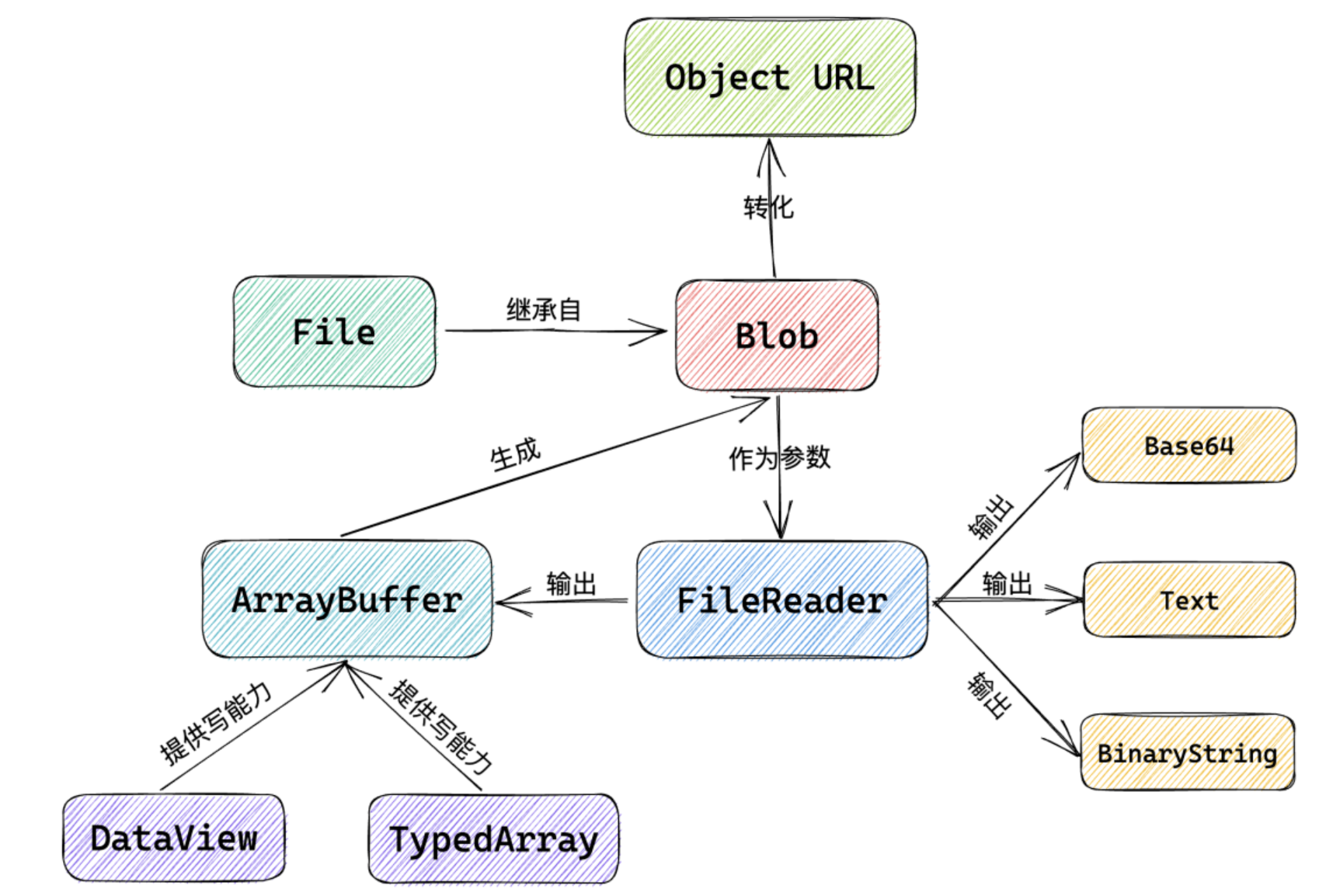 选择文件 -> File
需要预览、上传、读取内容 -> 用 FileReader 或 Blob 的内置方法
需要操作二进制数据(如修改、解析) -> 转成 ArrayBuffer
js
// 1. File -> DataURL (用于图片预览)
const reader = new FileReader();
reader.onload = e => img.src = e.target.result;
reader.readAsDataURL(file);//告诉 FileReader 把文件读成什么格式
//或者
const blob = file; // 直接赋值
const url = URL.createObjectURL(blob);
img.src = url;
URL.revokeObjectURL(url)//必须销毁
// 2. Blob -> ArrayBuffer (用于二进制操作)
const blob = new Blob(['Hello']);
const buffer = await blob.arrayBuffer(); // 使用 Blob 的 arrayBuffer() 方法
const uint8Array = new Uint8Array(buffer);

// 3. ArrayBuffer -> Blob (用于上传或生成文件)
const uint8Array = new Uint8Array([72, 101, 108, 108, 111]); // "Hello"
const newBlob = new Blob([uint8Array], { type: 'text/plain' });

// 4. DataURL -> Blob (将 Base64 图片转为 Blob 上传)
function dataURLToBlob(dataURL) {
  const arr = dataURL.split(',');
  const mime = arr[0].match(/:(.*?);/)[1];
  const bstr = atob(arr[1]);
  const n = bstr.length;
  const u8arr = new Uint8Array(n);
  while (n--) {
    u8arr[n] = bstr.charCodeAt(n);
  }
  return new Blob([u8arr], { type: mime });
}
//5.Blob -> File
// 转换为 File,并指定文件名和 MIME 类型
const file = new File(
        [blob],               // 第一个参数是数组,放入 Blob 数据
        'avatar.png',         // 文件名(必填)
        { type: blob.type }   // 文件类型(可选,最好保持一致)
);
防抖和节流
js
//防抖
function debounce(fn, delay) {
   let timer = null;
   return function(...args) {
      clearTimeout(timer); // 重置定时器
      timer = setTimeout(() => fn.apply(this, args), delay);
   };
}
//使用
const debouncedSubmit = debounce(function(){
   console.log('提交表单');
}, 1000);
//节流
function throttle(fn, interval) {
   let lastTime = 0;
   return function(...args) {
      const now = Date.now();
      if (now - lastTime >= interval) { // 间隔达标才执行
         fn.apply(this, args);
         lastTime = now; // 更新执行时间
      }
   };
}

// 使用示例
window.addEventListener('scroll', throttle(function() {
   console.log('滚动事件触发了!');
}, 200));
vue3中的使用方法
js
import { throttle, debounce } from 'lodash'

// 立即响应,但保证最多每500ms执行一次
const throttledFn = throttle(() => {
  // 即时反馈逻辑
}, 500)

// 确保最终状态被处理
const debouncedFn = debounce(() => {
   // 最终处理逻辑
}, 1000)
call、apply、bind
三者的共同用法就是可以改变函数的this指向,将函数绑定到上下文中
js
fun.call(thisArg, arg1, arg2, ...) //接受的是逗号分隔的参数列表
fun.apply(thisArg, [argsArray])//一个数组或者类数组对象作为第二个参数
fun.bind(thisArg)(arg)//因为函数bind返回的是一个函数,即将 fun 的 this 指向 obj 后不进行自身调用, 我们需要自己进行一次调用, 所以要在函数bind后面再加一个小括号进行自身调用, 而小括号里则可以输出传给 fun 函数的参数, 输入的可以是数组形式的,也可以是逐个传入的。
其中,thisArg 表示要改变的函数上下文,arg1、arg2、... 表示函数的参数列表。 如果使用 apply() 方法,则参数列表需要以数组的形式传递。这两个方法的区别在于参数的传递方式不同。
深拷贝和浅拷贝
一、浅拷贝(Shallow Copy)
核心概念:创建一个新对象,仅复制原始对象的 第一层属性值。若属性为 基本类型,拷贝其值;若为 引用类型(如对象、数组),则拷贝其内存地址(共享同一引用)。
特点:
修改新对象的 引用类型属性 会影响原对象。
修改新对象的 基本类型属性 不会影响原对象。
- 直接赋值 本质:将变量指向原对象的 内存地址,未创建新对象。
结果:新旧变量完全共享同一对象,任意修改均相互影响。
js
const obj = { a: 1, b: { c: 2 } };
const copy = obj; // 直接赋值
copy.a = 10;
copy.b.c = 20;

console.log(obj.a); // 10(基本类型也被修改)- 浅拷贝
本质:创建新对象,复制原对象的 第一层属性值。
结果:
基本类型属性:独立修改,互不影响。
引用类型属性:共享同一内存地址,修改相互影响。
js
const obj = { a: 1, b: { c: 2 } };
const copy = { ...obj }; // 浅拷贝(扩展运算符)
copy.a = 10;             // 修改基本类型属性
copy.b.c = 20;           // 修改引用类型属性

console.log(obj.a);      // 1(原对象未变)
console.log(obj.b.c);    // 20(原对象被修改)
三、数组的浅拷贝方法
- slice()
js
   const arr = [1, 2, { a: 3 }];
   const copy = arr.slice(); // 浅拷贝数组

copy[0] = 10;            // 修改基本类型元素
copy[2].a = 30;          // 修改引用类型元素

console.log(arr[0]);     // 1(原数组未变)
console.log(arr[2].a); // 30(原数组被修改)- concat()
js
  const arr = [1, 2, { a: 3 }];
const copy = arr.concat(); // 浅拷贝数组- 扩展运算符(...)
js
   const arr = [1, 2, { a: 3 }];
   const copy = [...arr]; // 浅拷贝数组
四、对象的浅拷贝方法
- Object.assign()
js
const obj = { a: 1, b: { c: 2 } };
const copy = Object.assign({}, obj); // 浅拷贝对象

copy.a = 10;        // 修改基本类型属性
copy.b.c = 20;      // 修改引用类型属性

console.log(obj.a); // 1(原对象未变)
console.log(obj.b.c); // 20(原对象被修改)- 扩展运算符(...)
js
const obj = { a: 1, b: { c: 2 } };
const copy = { ...obj }; // 浅拷贝对象
五、浅拷贝的局限性
嵌套引用类型:浅拷贝无法处理多层级对象或数组中的引用类型属性。
js
const original = { a: 1, b: { c: 2 }, d: [3] };
const copy = { ...original };

copy.b.c = 20; // 原对象被修改
copy.d.push(4); // 原数组被修改
console.log(original.b.c); // 20
console.log(original.d);   // [3, 4]
六、总结
浅拷贝:复制对象的第一层属性,适用于简单数据结构。
直接赋值:共享内存地址,无独立副本。
数组浅拷贝:slice()、concat()、扩展运算符。
对象浅拷贝:Object.assign()、扩展运算符。
深层拷贝需求:需使用深拷贝方法。
深拷贝(Deep Copy)
一、深拷贝的定义 核心概念:创建一个新对象,递归复制原始对象的所有层级属性(包括嵌套对象和数组),新对象与原对象完全独立,修改互不影响。
特点:
完全独立内存:所有层级的引用类型属性均为新对象。
适用场景:复杂嵌套对象、需完全隔离数据的场景(如状态管理、数据快照)。
二、深拷贝的常见实现方式
- JSON.parse(JSON.stringify()) 原理:将对象序列化为 JSON 字符串,再解析为新的对象。
js
const obj = { a: 1, b: { c: 2 }, d: [3] };
const copy = JSON.parse(JSON.stringify(obj));
copy.b.c = 20;
console.log(obj.b.c); // 2(原对象未变)
优点:简单快捷,适用于大多数 JSON 安全的数据。
缺点:
不支持特殊类型:忽略 undefined、Symbol、函数、循环引用。
破坏原型链:无法复制对象的构造函数和原型方法。
日期对象:会被转换为 ISO 字符串,反序列化为字符串而非 Date 对象。
- 递归手动实现
原理:递归遍历对象属性,逐层复制基本类型和引用类型。
示例:
简易版:
js
function deepCopy(newObj, oldObj) {
    debugger  //类似于在代码中设置断点
    for (let k in oldObj) {
        // 处理数组的问题  一定先写数组再写对象 不能颠倒
        if (oldObj[k] instanceof Array) {
            newObj[k] = []
            deepCopy(newObj[k], oldObj[k])
        } else if (oldObj[k] instanceof Object) {
            newObj[k] = {}
            deepCopy(newObj[k], oldObj[k])
        } else {
            newObj[k] = oldObj[k]
        }
    }
}
升级版:
js
function deepClone(source, map = new WeakMap()) {
   // 处理基本类型和 null
   if (source === null || typeof source !== 'object') return source;

   // 处理循环引用
   if (map.has(source)) return map.get(source);

   // 处理数组和对象
   const target = Array.isArray(source) ? [] : {};
   map.set(source, target);

   // 递归复制属性
   for (const key in source) {
      if (source.hasOwnProperty(key)) {
         target[key] = deepClone(source[key], map);
      }
   }
   return target;
}

// 使用示例
const obj = { a: 1, b: { c: 2 }, d: [3] };
const copy = deepClone(obj);
copy.b.c = 20;
console.log(obj.b.c); // 2(原对象未变)
优点:
支持所有数据类型(需扩展代码处理 Date、RegExp、Map、Set 等)。
可处理循环引用(通过 WeakMap 缓存)。
缺点:
实现复杂,需处理多种边界情况。
性能较低(递归遍历耗时)。
- 第三方库(如 Lodash 的 _.cloneDeep())
原理:成熟的深拷贝实现,处理了各种数据类型和边界条件。
示例:
js
const _ = require('lodash');
const obj = { a: 1, b: { c: 2 }, d: [3] };
const copy = _.cloneDeep(obj);
copy.b.c = 20;
console.log(obj.b.c); // 2
优点:
功能全面,支持复杂类型(如 Date、RegExp、Map、Set)。
高性能且经过严格测试。
缺点:需引入外部库。
原型链
什么是原型 在JavaScript中,每个对象都有一个内部属性指向其原型对象。这个原型对象可以是另一个对象,形成一个链式结构。这种结构被称为原型链。
proto 属性 每个对象都有一个隐式属性 proto,指向其构造函数的原型对象。通过这个属性,JavaScript能够实现对象之间的继承。
原型对象 在JavaScript中,构造函数的原型对象是通过 Function.prototype 上的 prototype 属性实现的。当我们使用 new 关键字创建一个对象时,该对象的 proto 属性指向构造函数的 prototype 属性。
js
function Person() {}
    var per = new Person();

    console.log(per.__proto__ === Person.prototype); // true
    console.log(Person.prototype.__proto__ === Object.prototype); // true
    console.log(Object.prototype.__proto__); // null
JS二进制系列
1.blob
Blob 全称为 binary large object ,即二进制大对象,它是 JavaScript 中的一个对象,表示原始的类似文件的数据。 (1)Blob 创建
js
new Blob(array, options);其有两个参数:
array:由 ArrayBuffer、ArrayBufferView、Blob、DOMString 等对象构成的,将会被放进 Blob; options:可选的 BlobPropertyBag 字典,它可能会指定如下两个属性 type:默认值为 "",表示将会被放入到 blob 中的数组内容的 MIME 类型。 endings:默认值为"transparent",用于指定包含行结束符\n的字符串如何被写入,不常用。
js
const blob = new Blob(["Hello World"], {type: "text/plain"});

console.log(blob.size); // 11
console.log(blob.type); // "text/plain"
那该如何使用 Blob 对象呢?可以使用 URL.createObjectURL() 方法将将其转化为一个 URL
(2)Blob 分片 除了使用Blob()构造函数来创建blob 对象之外,还可以从 blob 对象中创建blob,也就是将 blob 对象切片。Blob 对象内置了 slice() 方法用来将 blob 对象分片,其语法如下:
js
const blob = instanceOfBlob.slice([start [, end [, contentType]]]};其有三个参数:
start:设置切片的起点,即切片开始位置。默认值为 0,这意味着切片应该从第一个字节开始; end:设置切片的结束点,会对该位置之前的数据进行切片。默认值为blob.size; contentType:设置新 blob 的 MIME 类型。如果省略 type,则默认为 blob 的原始值。
js
const iframe = document.getElementsByTagName("iframe")[0];

const blob = new Blob(["Hello World"], {type: "text/plain"});

const subBlob = blob.slice(0, 5);

iframe.src = URL.createObjectURL(subBlob);
2. File
文件(File)接口提供有关文件的信息,并允许网页中的 JavaScript 访问其内容。实际上,File 对象是特殊类型的 Blob,且可以用在任意的 Blob 类型的 context 中。Blob 的属性和方法都可以用于 File 对象。 注意:File 对象中只存在于浏览器环境中,在 Node.js 环境中不存在。
3.ArrayBuffer
ArrayBuffer 对象用来表示通用的、固定长度的原始二进制数据缓冲区。ArrayBuffer 的内容不能直接操作,只能通过 DataView 对象或 TypedArrray 对象来访问。这些对象用于读取和写入缓冲区内容。
ArrayBuffer 本身就是一个黑盒,不能直接读写所存储的数据,需要借助以下视图对象来读写:
TypedArray:用来生成内存的视图,通过9个构造函数,可以生成9种数据格式的视图。 DataViews:用来生成内存的视图,可以自定义格式和字节序。
ArrayBuffer 可以通过以下方式生成:
js
new ArrayBuffer(bytelength)ArrayBuffer()构造函数可以分配指定字节数量的缓冲区,其参数和返回值如下:
参数:它接受一个参数,即 bytelength,表示要创建数组缓冲区的大小(以字节为单位。); 返回值:返回一个新的指定大小的ArrayBuffer对象,内容初始化为0。
TypedArray 对象一共提供 9 种类型的视图,每一种视图都是一种构造函数。如下:
| 元素 | 类型化数组 | 字节 | 描述 |
|---|---|---|---|
| Int8 | Int8Array | 1 | 8 位有符号整数 |
| Uint8 | Uint8Array | 1 | 8 位无符号整数 |
| Uint8C | Uint8ClampedArray | 1 | 8 位无符号整数 |
| Int16 | Int16Array | 2 | 16 位有符号整数 |
| Uint16 | Uint16Array | 2 | 16 位无符号整数 |
| Int32 | Int32Array | 4 | 32 位有符号整数 |
| Uint32 | Uint32Array | 4 | 32 位无符号整数 |
| Float32 | Float32Array | 4 | 32 位浮点 |
| Float64 | Float64Array | 8 | 64 位浮点 |
4.base64
在 JavaScript 中,有两个函数被分别用来处理解码和编码 base64 字符串:
atob():解码,解码一个 Base64 字符串; btoa():编码,从一个字符串或者二进制数据编码一个 Base64 字符串。
js
btoa("JavaScript")       // 'SmF2YVNjcmlwdA=='
atob('SmF2YVNjcmlwdA==') // 'JavaScript'
5.格式转化
看完这些基本的概念,下面就来看看常用格式之间是如何转换的。
(1)ArrayBuffer → blob
js
const blob = new Blob([new Uint8Array(buffer, byteOffset, length)]);(2)ArrayBuffer → base64
js
const base64 = btoa(String.fromCharCode.apply(null, new Uint8Array(arrayBuffer)));(3)base64 → blob
js
const base64toBlob = (base64Data, contentType, sliceSize) => {
const byteCharacters = atob(base64Data);
const byteArrays = [];

for (let offset = 0; offset < byteCharacters.length; offset += sliceSize) {
const slice = byteCharacters.slice(offset, offset + sliceSize);

    const byteNumbers = new Array(slice.length);
    for (let i = 0; i < slice.length; i++) {
      byteNumbers[i] = slice.charCodeAt(i);
    }

    const byteArray = new Uint8Array(byteNumbers);
    byteArrays.push(byteArray);
}

const blob = new Blob(byteArrays, {type: contentType});
return blob;
}
(4)blob → ArrayBuffer
js
function blobToArrayBuffer(blob) {
    return new Promise((resolve, reject) => {
        const reader = new FileReader();
        reader.onload = () => resolve(reader.result);
        reader.onerror = () => reject;
        reader.readAsArrayBuffer(blob);
    });
}
(5)blob → base64
js
function blobToBase64(blob) {
    return new Promise((resolve) => {
        const reader = new FileReader();
        reader.onloadend = () => resolve(reader.result);
        reader.readAsDataURL(blob);
    });
}
(6)blob → Object URL
js
const objectUrl = URL.createObjectURL(blob);```localForage
js
import localforage from 'localforage'

await localforage.setItem('name', '张三')

const value = await localforage.getItem('name')

console.log(value)| 对比项 | localStorage | localForage |
|---|---|---|
| API | 同步 | 异步(Promise) |
| 容量 | 约 5~10MB | 通常几十 MB 到几百 MB(取决于浏览器) |
| 数据类型 | 字符串 | 对象、Blob、File、ArrayBuffer 等 |
| 底层 | localStorage | IndexedDB(优先) |
| 是否需要 JSON.stringify | ✅ | ❌ |
| 适合 | Token、主题配置 | 图片、缓存、离线数据、大对象 |
requestAnimationFrame
requestAnimationFrame 会告诉浏览器:"我下一帧要更新页面,请在下一次重绘之前执行我的代码。" 特别适合所有需要频繁更新 UI 的场景,如动画、拖拽、Canvas 绘制、图表渲染和视频播放
js
requestAnimationFrame(() => {
    console.log("下一帧执行");
});| setInterval | requestAnimationFrame |
|---|---|
| 固定时间执行 | 根据浏览器刷新率执行 |
| 不管页面是否渲染 | 渲染前执行 |
| 后台也可能继续运行(受浏览器限制) | 后台标签页通常暂停 |
| 容易掉帧 | 更流畅 |
| CPU 更高 | 浏览器统一调度,性能更好 |
停止RAF
js
const id = requestAnimationFrame(fn)
cancelAnimationFrame(id)